
Benefits
Reduce manual data entry when enrolling new patients or verifying insurance coverage at the point of care.
Speed up claims processing by extracting insurer, member, and group numbers directly from the card image.
Minimise errors caused by illegible handwriting or worn-out cards by relying on AI-powered OCR rather than staff transcription.
How it works
- Step 1
Upload
Send the document to the API as a file or a URL no special formatting required.
- Step 2
The engine reads the document
The engine analyzes the page layout and identifies the content that matters. The engine reads the text and layout of US health insurance cards, extracting insurer names, member identifiers, group numbers, and prescription benefit information from phone photos, scans, and digital PDFs.
- Step 3
Structured JSON is returned
Every extracted element comes back as structured JSON, positioned and typed, ready to feed into downstream systems.
- Step 4
Confidence-based review
Each field carries a confidence score, so low-confidence results can be routed for human review instead of trusted blindly.
Example fields
A sample of what extraction can return, and many more when they appear on the document.
Features
Extracts insurer name, member details, date of birth, identification numbers, group number, and prescription-related fields from US health insurance cards.
Handles phone-captured photos, scanned documents, and digital PDFs without requiring a specific card layout.
Returns a structured JSON response that can be passed directly to downstream systems via API or workflow automation tools like n8n, Zapier, or Make.
Supports English-language cards from US health insurers.
Use cases
Automated patient check-in and insurance verification
When a new patient arrives, scan their health insurance card and instantly populate the practice management system with member name, ID number, and group number. Staff can verify coverage in seconds rather than re-typing every field.
Insurance claims data preparation
Submit clean, structured data from the health insurance card directly into the claims pipeline. The extracted member ID, insurer name, and date of birth reduce manual data re-entry and help downstream billing systems process claims faster, always verified by a qualified reviewer before any billing decision.
Prescription benefit verification for pharmacies
Extract RxBIN, RxPCN, RxGroup, and RxPlan from the card to look up patient prescription coverage in real time. Pharmacists can verify copay and formulary status without keying in numbers by hand, with pharmacist review before any coverage decision.
Integration with EHR and practice management platforms
Feed extracted card data into electronic health record (EHR) systems or CRM platforms using workflow automation tools. Patient demographics, insurance identifiers, and coverage periods are mapped to the correct fields without manual intervention.
LIVE DEMO
Try extracting data from a health insurance card
Upload a sample health insurance card image (PDF, JPG, or PNG) to see the extracted fields in real time.
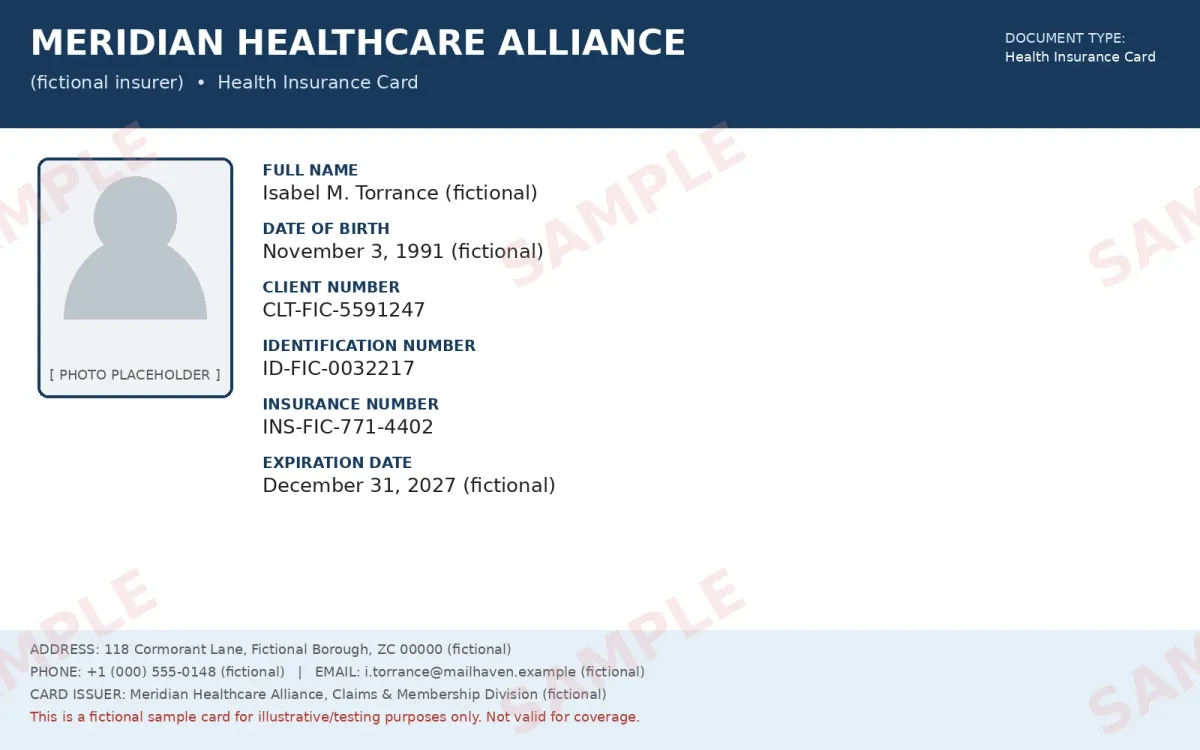
Select a document and press Parse
Want to run it on your own documents?
Ready to dive in? Request a key to get started.Business advantages
- Cut patient onboarding time by removing manual data entry.
- Reduce claim rejections caused by transcribed ID or group number errors.
- Works out of the box on most US health insurance card layouts, with no per-document template required.
- Integrate with your existing tools via API or low-code connectors.
Frequently asked questions
How much does the health insurance card extraction API cost?
Pricing is based on the number of pages processed. Visit the ByteIt pricing page for current credit rates and plan options.
How do I integrate health insurance card extraction into my application?
ByteIt offers a REST API that returns structured JSON. You can also connect it to your workflow using automation tools like n8n, Zapier, or Make for no-code integrations.
Which image formats are supported?
The engine accepts PDF, JPG, and PNG files. Photos taken with a phone camera work well as long as the card is reasonably centred and well lit.
Can it read a health insurance card from a low-quality photo or scan?
Yes. The model is trained on a variety of image qualities, including phone-captured photos, scans, and worn cards. Better lighting and focus produce the most reliable results.
What are the most common use cases for health insurance card extraction?
Patient onboarding, insurance verification at check-in, claims data preparation, and pharmacy prescription benefit checks are the primary workflows.
How accurate is the extraction for health insurance cards?
Accuracy depends on image quality and card complexity. The engine performs well on standard US health insurance card layouts. We recommend testing with your own card images to validate performance for your specific use case.
Does the extraction work with multi-page documents?
Each page of a multi-page PDF is processed independently. If a card has information on both the front and back, both sides should be included in the submission.