
Benefits
Eliminates manual rekeying of transit declaration data into NCTS or customs brokerage systems, reducing data entry time per shipment from minutes to seconds
Flags missing or inconsistent fields such as missing seal numbers or mismatched gross weight so corrections can be made before a shipment is rejected at the border
Supports both T1 and T2 documents in a single extraction model, removing the need to train separate pipelines for each transit type
Enables logistics teams to process high volumes of transit declarations in batch, keeping pace with peak shipping periods without adding headcount
How it works
- Step 1
Upload
Send the document to the API as a file or a URL no special formatting required.
- Step 2
The engine reads the document
The engine analyzes the page layout and identifies the content that matters. The engine reads the structured fields of both T1 and T2 transit declarations, extracting sender and recipient identifiers, package and seal counts, weight figures, customs tariff numbers, and transit routing codes from scanned or digital forms.
- Step 3
Structured JSON is returned
Every extracted element comes back as structured JSON, positioned and typed, ready to feed into downstream systems.
- Step 4
Confidence-based review
Each field carries a confidence score, so low-confidence results can be routed for human review instead of trusted blindly.
Example fields
A sample of what extraction can return, and many more when they appear on the document.
Features
Extracts header-level and line-level fields from scanned T1/T2 forms and digital PDF declarations, such as sender and recipient details, package counts, gross and net weight, seal numbers, and many more.
Returns structured JSON with standardised field labels mapped to common customs system schemas, reducing the integration effort when feeding data into NCTS or ERP modules
Handles multi-page T1/T2 declarations that span several sheets, preserving field associations across pages for a single coherent output record
Processes documents in PDF, JPG, and PNG formats, including photographs taken by mobile devices of paper transit declarations
Use cases
Automated NCTS data ingestion
Logistics providers and customs brokers receive dozens of T1/T2 declarations per day, each requiring manual data entry into the NCTS portal. By extracting fields such as MRN, sender/recipient EORI numbers, package counts, and seal numbers directly from the submitted document, the data can be pre-populated into the NCTS interface or exported as a structured file for batch upload, cutting per-declaration processing time from minutes to seconds — always verified by a human before submission.
Transit compliance verification before departure
When a T1 or T2 declaration is being prepared, the sender must confirm that every required field is present and consistent. ByteIt can run a pre-submission check: extract all fields from the draft document, compare the number of seals declared against the count recorded on the transport unit, and flag any missing or mismatched values such as an absent customs tariff number or an inconsistent gross weight, allowing corrections before the goods reach the office of departure — with human review before any filing decision.
Integration with customs brokerage and ERP systems
Once a T1/T2 document has been processed, the structured output including transit numbers, commodity codes, routing data, and seal information can be forwarded to a brokerage platform or ERP module through workflow automation tools like n8n, Zapier, or Make. This eliminates the need to copy information across disconnected systems and ensures that the customs record, warehouse inventory, and accounting entries all reference the same data set.
Batch reconciliation of transit closures
After a transit movement is completed, the office of destination returns a closure notification that must be matched to the original T1/T2 declaration. By extracting the MRN, office of destination, and seal numbers from both the original declaration and the closure notification, logistics teams can automate the reconciliation process, identifying unmatched or overdue movements that require follow-up with customs authorities.
Cross-border freight audit and duty deferment tracking
Finance and compliance teams need to verify that the duties deferred under a T1 declaration are correctly calculated and eventually settled. Extracted data such as country of export, country of destination, commodity codes, and declared value can be fed into a duty-tracking dashboard, enabling auditors to reconcile deferred amounts against final customs clearance bills without manually opening each transit declaration.
LIVE DEMO
Try it yourself
Upload a sample T1 or T2 transit declaration in PDF, JPG, or PNG format and see the extracted fields returned instantly as structured JSON.
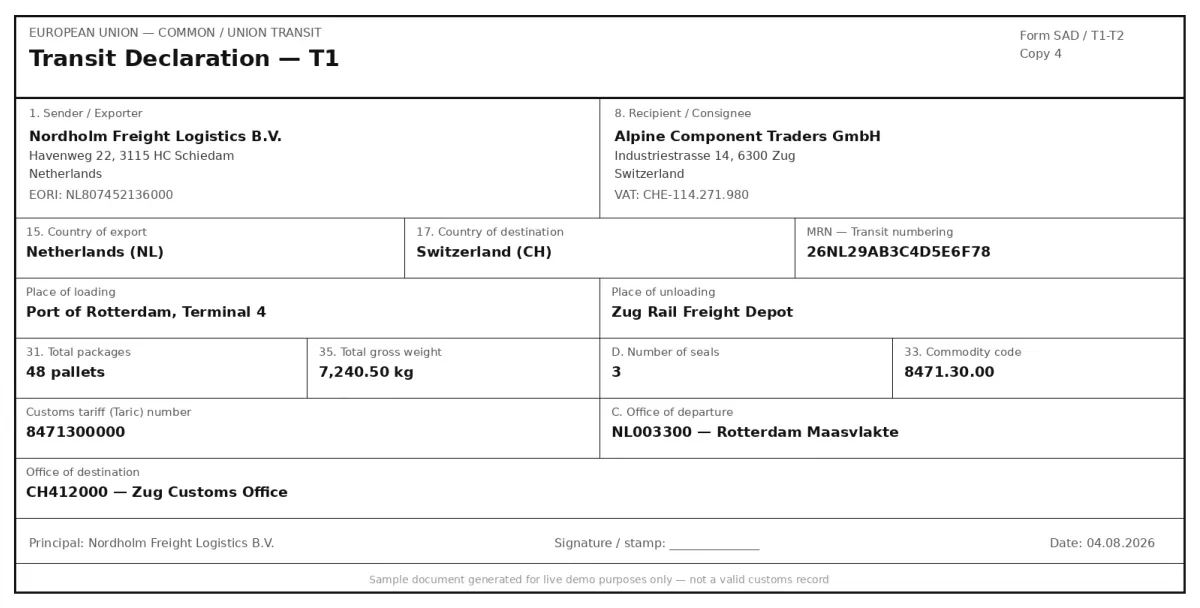
Select a document and press Parse
Want to run it on your own documents?
Ready to dive in? Request a key to get started.Business advantages
- Built for EU customs workflows, with field labels that map cleanly to NCTS and standard transit declaration schemas
- No minimum volume commitments or per-document setup fees; pay only for the pages you process
- Handles low-quality scans and mobile photographs of paper T1/T2 forms, with high-confidence fields preserved on lower-quality copies
- GDPR-compliant data processing with no permanent storage of your documents unless you choose to retain them
Frequently asked questions
What is the difference between a T1 and a T2 document, and does ByteIt handle both?
A T1 document is used for non-Union goods moving through the EU customs territory with duties deferred until final destination. A T2 document is used for Union goods already in free circulation that transit through non-EU countries. ByteIt extracts data from both T1 and T2 declarations using the same extraction engine, so there is no need to build separate pipelines for each type.
What file formats are supported for T1/T2 document extraction?
ByteIt accepts PDF, JPG, and PNG files. This includes digitally generated PDFs as well as scanned paper forms or photographs taken with a mobile phone. The engine is designed to handle the varying print quality and layout differences typical of customs document copies.
Can the extraction handle multi-page T1/T2 declarations?
Yes. T1 and T2 declarations often span multiple pages when a shipment includes several commodity lines. ByteIt processes all pages and consolidates the extracted data into a single structured JSON record, preserving the relationship between line items and their customs tariff numbers.
How accurate is the extraction for low-quality scans of transit documents?
The engine is trained on a broad range of real-world customs documents, including carbon copies, faxed declarations, and faded thermal prints. Fields such as MRN numbers and EORI codes, which follow predictable formats, are extracted with high reliability even from imperfect scans. The output includes confidence indicators so you can route uncertain fields to a human reviewer.
How do I integrate the T1/T2 extraction into my existing customs software?
ByteIt provides a REST API that returns extracted data in structured JSON. You can connect it to your NCTS portal, customs brokerage platform, or ERP using workflow automation tools such as n8n, Zapier, or Make, or by writing a direct integration using the API. No special SDK is required.
What pricing model do you use?
ByteIt charges per page processed, with no monthly minimum or long-term contract. You receive a set number of free credits to test the engine with your own documents before committing. Volume pricing is available for high-throughput logistics operations.
Does the engine extract line-item details such as commodity codes per product line?
Yes. When a T1/T2 declaration lists multiple commodity lines with separate customs tariff numbers, descriptions, weights, and package counts, the engine extracts each line individually and returns them as structured line items within a single output record.