
Benefits
Eliminate manual data entry for price surveys, competitor monitoring, and inventory checks, capture hundreds of price tags in minutes instead of hours.
Standardise pricing data across stores and regions: the same JSON schema for every price tag makes it easy to compare prices, discounts, and promotions at scale.
Speed up market research cycles by feeding structured price data directly into your analysis pipeline, without transcription errors.
Reduce operational cost of price audits and compliance checks by replacing field teams' manual note-taking with a simple photo-and-upload workflow.
How it works
- Step 1
Upload
Send the document to the API as a file or a URL no special formatting required.
- Step 2
The engine reads the document
The engine analyzes the page layout and identifies the content that matters. The extraction engine reads price tags of any common retail layout, shelf-edge labels, swing tags, barcode stickers, and promotional signage, and identifies product-identifying fields such as name, price, currency, discount, barcode, SKU, and store name.
- Step 3
Structured JSON is returned
Every extracted element comes back as structured JSON, positioned and typed, ready to feed into downstream systems.
- Step 4
Confidence-based review
Each field carries a confidence score, so low-confidence results can be routed for human review instead of trusted blindly.
Example fields
A sample of what extraction can return, and many more when they appear on the document.
Features
Accepts uncropped smartphone photos via bounding-box auto-detection, no need to frame the tag perfectly.
Extracts fields such as product name, brand, price, currency, discount, unit price, quantity, barcode, SKU, category, promotion, validity date, store name, and many more.
Returns structured JSON output via REST API, ready to integrate into any retail or logistics workflow.
Supports mobile SDK integration for in-app capture, ensuring consistent image quality from the point of capture.
Use cases
Competitor price monitoring at scale
Retail teams photograph price tags across competitor stores and upload them via a mobile app. ByteIt's API extracts every price, discount, and promotion into structured data, which is then fed into a pricing dashboard or spreadsheet. Teams can spot pricing trends and adjust their own strategy in days instead of weeks.
Retail shelf audit and compliance
Brand owners and category managers conduct periodic shelf audits to verify that retailers are displaying the correct prices, promotions, and product labels. Field agents capture price tag images; the extraction engine outputs product name, SKU, price, and promotion details. Results are compared against the agreed planogram and flagged for non-compliance automatically.
Automated inventory and category analysis
Store associates or warehouse staff scan price tags during stock checks. The extracted barcode, SKU, and product name are matched against inventory records to verify stock levels and pricing accuracy. Discrepancies are surfaced in real time, reducing stock-count labour and improving data quality.
Market research data pipeline
Market research firms collect thousands of price points across multiple retail chains for category analysis or economic reports. ByteIt's API converts the raw images into clean JSON rows that can be loaded directly into analytics platforms like Tableau or Power BI, bypassing manual keying altogether.
Loyalty and promotion programme enforcement
Retailers validate that promotional price tags in-store match the campaign parameters configured in their loyalty system. Uploaded price tag images are parsed for promotion text, discount amount, and validity date, and cross-checked against campaign rules, catching misplaced or expired signage before customers reach the till.
LIVE DEMO
Try it yourself
Upload a sample price tag image or use one of our demo files below to see the extracted fields in real time. Supports PDF, JPG, and PNG formats.
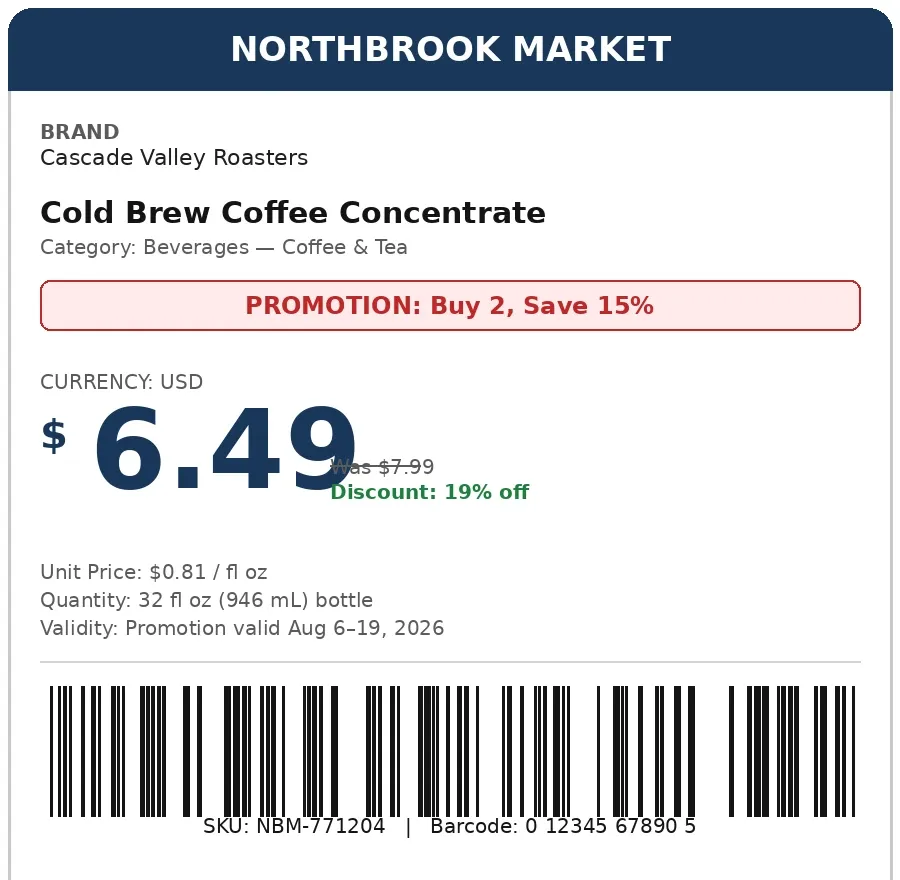
Select a document and press Parse
Want to run it on your own documents?
Ready to dive in? Request a key to get started.Business advantages
- Works with any smartphone camera, no special hardware needed.
- JSON output ready for n8n, Zapier, Make, or direct API integration.
- Handles multi-currency and multi-language price tags out of the box.
- Scalable from a single store audit to enterprise-wide price monitoring.
Frequently asked questions
What does ByteIt's price tag extraction cost?
ByteIt offers flexible pricing plans based on document volume. You can start with a free tier for testing and scale up with pay-as-you-go or monthly subscription plans. Visit the ByteIt pricing page for current rates.
How do I integrate ByteIt's price tag API?
ByteIt provides a REST API with simple JSON input/output. You can call it directly from your code or connect it to workflow tools like n8n, Zapier, or Make for no-code automation. Mobile SDKs are also available for in-app capture workflows.
What file formats are supported for price tag images?
The API accepts JPG, JPEG, PNG, PDF, DOC, DOCX, XLSX, HEIC, and WEBP formats. Images can be cropped or uncropped, the engine auto-detects the price tag bounding box.
Does it work with low-quality or angled photos?
Yes. The OCR engine is trained on real-world retail photos, including dim lighting, slight angles, and wrinkled or partially obscured tags. For best results, ensure the price tag text is roughly legible to the human eye.
Can it extract barcodes and SKU codes from price tags?
Yes. Barcode, SKU, and product code fields are extracted as part of the standard output. The engine reads both 1D (UPC/EAN) and common 2D barcode formats embedded in price tag labels.
Is multi-page handling supported for price tag batches?
Yes. If you upload a multi-page PDF containing multiple price tags, the engine processes each page independently and returns a combined JSON array with per-page results.