
Benefits
Significantly reduce employer statement processing time by eliminating manual data entry
Remove the compliance risk of retyped or misread figures such as salary and working hours
Enable HR and mortgage underwriting teams to process metadata instantly rather than hiring more data entry staff
Handle multi-page employer statements without splitting or recombining files manually
How it works
- Step 1
Upload
Send the document to the API as a file or a URL no special formatting required.
- Step 2
The engine reads the document
The engine analyzes the page layout and identifies the content that matters. ByteIt's extraction engine reads employer statements by interpreting the semantic meaning of each data field, salary, working hours, contract dates, employer name, across varied document layouts and whether it spans multiple pages.
- Step 3
Structured JSON is returned
Every extracted element comes back as structured JSON, positioned and typed, ready to feed into downstream systems.
- Step 4
Confidence-based review
Each field carries a confidence score, so low-confidence results can be routed for human review instead of trusted blindly.
Example fields
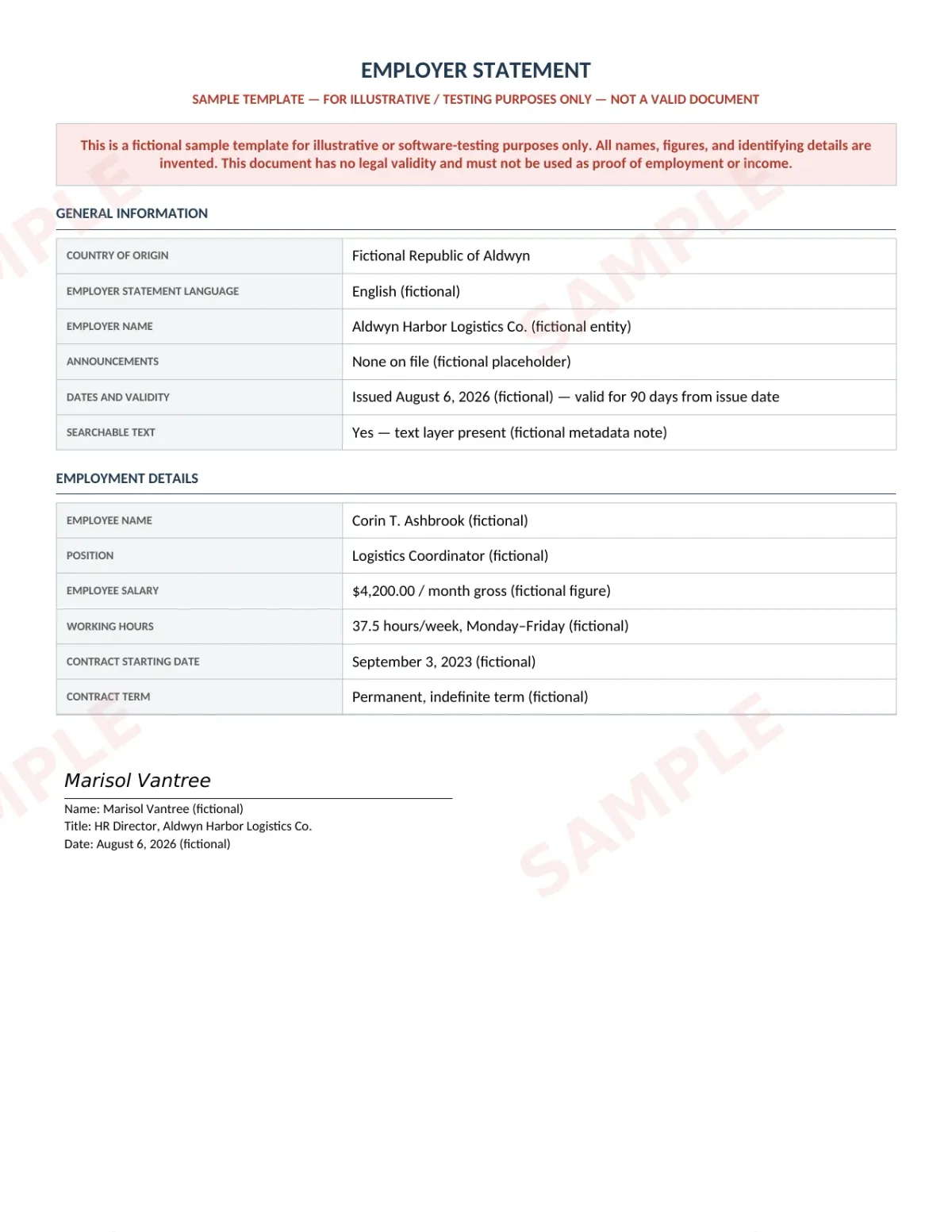
A sample of what extraction can return, and many more when they appear on the document.
Features
AI-powered OCR that reads employer statements across common layouts without requiring per-document template configuration
Extracts structured fields such as employee name, salary, working hours, contract start date, validity dates, and many more.
Supports input formats: PDF, JPG, JPEG, PNG, HEIC, WebP, DOC, DOCX, XLSX
Returns output as JSON, XML, or CSV for direct integration with HRIS, ERP, or lending platforms
Processes single-page and multi-page employer statements in a single API call
Use cases
Mortgage and loan underwriting
A mortgage underwriter receives a borrower's employment verification letter alongside bank statements and tax returns. ByteIt extracts salary, contract term, and employer name from the employer statement and outputs structured data that can be compared directly against payslip YTD figures, significantly reducing manual cross-check time per application, always verified by a qualified reviewer before any lending decision.
Rental tenant verification
Property management firms collect employer statements from applicants to verify income and employment status. ByteIt extracts the employee salary and working hours fields, enabling the leasing team to auto-populate their tenant screening system and flag applicants who meet the income threshold without opening every PDF, with human review before any rental eligibility decision.
HR onboarding and offboarding
When a new hire joins, their signed employment contract contains start date, salary, probation period, and notice terms. ByteIt extracts these fields and feeds them into the HRIS, Workday, BambooHR, or PeopleForce, via a webhook or workflow tool like Zapier, Make, or n8n, significantly reducing the manual data entry per new starter.
Government benefit and visa processing
Immigration agencies and social security offices process employer statements to verify an applicant's employment history and income. ByteIt extracts contract dates, salary, and employer name in a structured format that can be routed directly into case management systems, reducing processing backlogs, with human review before any eligibility or benefit decision.
LIVE DEMO
Try extracting employer statement data yourself
Upload a sample employer statement in PDF, JPG, or PNG format and see the extracted fields in seconds, no sign-up required.
Select a document and press Parse
Want to run it on your own documents?
Ready to automate employer statement processing? Get your API key in Studio.Business advantages
- No per-document templates to configure, AI reads most layouts
- Process multi-page statements in one API call
- Output ready for HRIS, ERP, and lending systems
- European data residency and GDPR-compliant processing
Frequently asked questions
How much does the employer statement extraction API cost?
ByteIt offers usage-based pricing with a free tier for testing. Visit the pricing page on byteit.ai for the latest plans and credit limits.
How do I integrate employer statement extraction into my application?
Integrate via REST API or one of ByteIt's SDKs. You can also connect the output to workflow tools like Zapier, Make, or n8n to route extracted data directly into your HRIS or underwriting platform without writing custom code.
What languages does the engine support for employer statements?
The extraction engine supports employer statements written in English and major European languages. Extracted fields can include a language field to identify which language the statement is written in, along with salary, dates, and many more depending on the letter.
What file formats can I upload?
ByteIt accepts PDF, JPG, JPEG, PNG, HEIC, WebP, DOC, DOCX, and XLSX files. Both single-page and multi-page documents are supported.
How accurate is the data extraction for employer statements?
The AI engine is designed to handle varied layouts typical of employer statements. Accuracy depends on scan quality and document legibility, but the semantic approach means it does not break when the layout changes.
Can it handle multi-page employer statements such as an employment contract with annexes?
Yes. ByteIt processes multi-page documents in a single API call and returns all extracted fields aggregated from the entire document.
Does it extract signatures from employer statements?
Yes. The engine can detect and extract signature fields from employer statements, which is useful for verifying that the document has been signed by the authorised person.
Related documents
Resumes Cv
Extract structured data from resumes and CVs in a wide range of layouts and languages. Parse names, contact details, work history, education, and skills with AI-powered accuracy.
Motivational Letter
Extract key fields from motivational letters automatically using ByteIt's AI-powered OCR API. Names, dates, language quality, and more. Reduce manual screening effort.