
Benefits
Eliminates manual data entry during enrolment and registration periods, freeing admissions staff for higher-value tasks
Reduces verification time for access control, library membership and exam hall entry to seconds per card
Supports batch processing of bulk student ID scans, making orientation-week onboarding manageable at scale
Minimises transcription errors in identity fields such as student numbers and date of birth that could lock students out of essential systems
How it works
- Step 1
Upload
Send the document to the API as a file or a URL no special formatting required.
- Step 2
The engine reads the document
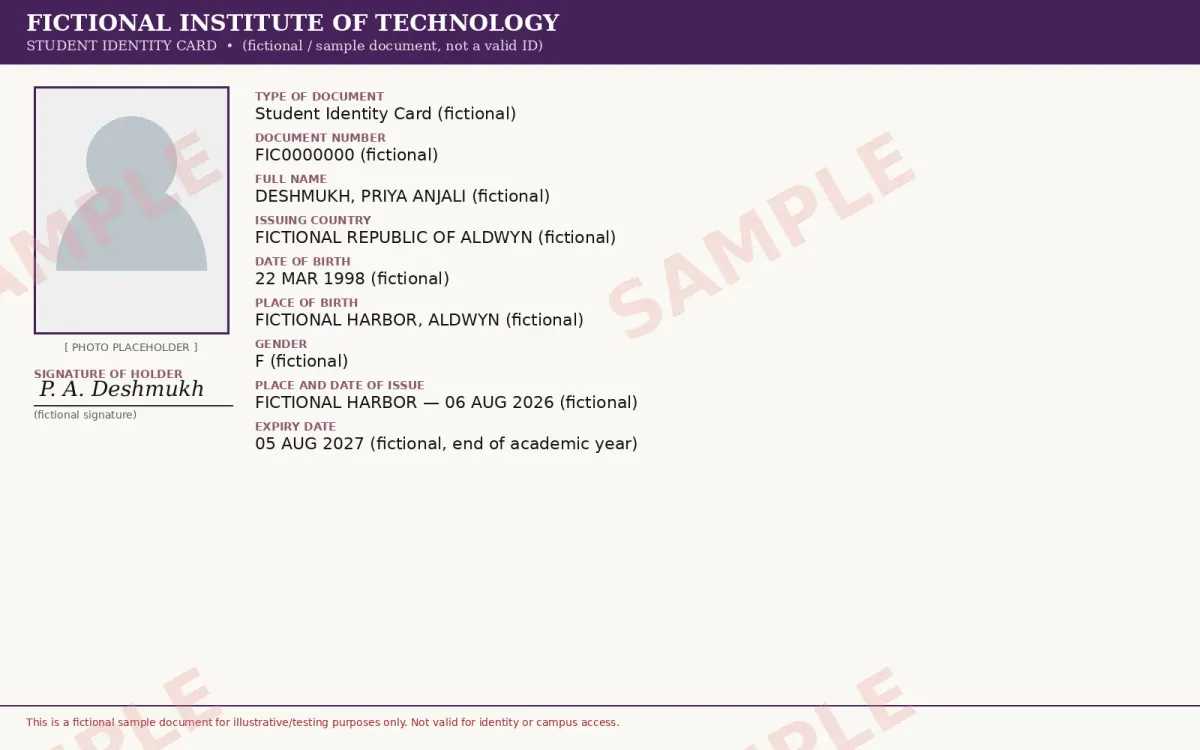
The engine analyzes the page layout and identifies the content that matters. The extraction engine reads the printed fields on student ID cards, such as full name, student or document number, date of birth, issue and expiry dates, and issuing institution, across common layout orientations and background designs.
- Step 3
Structured JSON is returned
Every extracted element comes back as structured JSON, positioned and typed, ready to feed into downstream systems.
- Step 4
Confidence-based review
Each field carries a confidence score, so low-confidence results can be routed for human review instead of trusted blindly.
Example fields
A sample of what extraction can return, and many more when they appear on the document.
Features
Reads printed text fields from student ID cards across varied layouts and background designs using AI-driven OCR
Accepts card images in JPG, PNG, PDF, HEIC and other common formats via a single REST API call or Python SDK
Returns extracted data in structured JSON for direct ingestion into student information systems (SIS), HR databases or KYC workflows
Handles both cropped and uncropped images, the engine automatically detects and crops the card region when the full image is sent
Use cases
Enrolment and Registration Onboarding
When a new cohort arrives at the start of the academic year, the admissions office collects hundreds of student ID cards for verification. ByteIt extracts each student's name, student ID number and date of birth, then feeds the structured data into the student information system (SIS). The automated workflow eliminates weeks of manual data entry and eliminates typos that could delay course registration or housing assignments.
Campus Access Control Automation
University security teams need to register students quickly into turnstile, dormitory and lab access systems. By reading the document number and expiry date from each student ID card, ByteIt populates the access control database in real time. Expired cards are flagged automatically, and re-registration of returning students is handled without re-entering identity data.
Library Membership and Exam Hall Verification
Libraries and exam halls require fast verification of student identity against a register. A staff member photographs the student ID card at the entry point; ByteIt extracts the name and student number and cross-references them with the day's attendance list. Cards that do not match the register or have expired are flagged, and legitimate students pass through in seconds.
KYC and Identity Verification for Student Services
Financial aid offices, scholarship bodies and campus banks require proof of identity before releasing funds or opening accounts. ByteIt extracts the full name, date of birth, photo and signature from student ID cards, producing a structured output that can be submitted directly into KYC compliance workflows. The verification step is reduced from a manual form-check to an automated API call, with a human review step for high-stakes identity decisions.
Integration with Workflow Automation Tools
The extracted JSON payload can be passed to workflow automation tools such as n8n, Zapier or Make, triggering downstream actions like sending a welcome email, updating a CRM record, creating a campus Wi-Fi account or generating a student ID report. Institutions can build end-to-end enrolment pipelines without writing custom middleware for each system.
LIVE DEMO
Try Student ID Card Extraction
Upload a sample student ID card image or PDF to see the extracted fields in real time. We support JPG, PNG, PDF and HEIC formats.
Select a document and press Parse
Want to run it on your own documents?
Ready to automate student ID processing? Get your API key in Studio.Business advantages
- Pay only for what you use, from a free Build plan to Scale and Enterprise tiers
- GDPR-compliant with end-to-end encryption and zero-data-retention options
- Sub-second processing per card with batch support for high-volume periods
- Python SDK and REST API for easy integration into any existing campus system
Frequently asked questions
How much does the Student ID Card extraction API cost?
ByteIt uses simple, usage-based pricing with a free tier to get started and competitive per-page rates that typically cost just a few cents per page. Higher-volume plans add parallel processing and team API keys, and Enterprise plans offer flexible pricing, zero data retention, and optional on-premise deployment for high volumes and custom compliance needs. See the pricing page on byteit.ai for current plans and rates.
How do I integrate the Student ID Card extraction into my enrolment system?
ByteIt provides a simple REST API and a Python SDK. You send the student ID card image to the endpoint and receive a structured JSON response. The extracted data can then be forwarded to your SIS, CRM or HR platform, either directly or through workflow automation tools such as n8n, Zapier or Make.
What languages and alphabets does the engine support for student ID cards?
ByteIt's OCR engine handles documents in multiple languages, including those using Latin, Cyrillic and other common alphabets. The output text is returned as-is from the card, so the system preserves the original language of the printed fields.
What file formats are accepted for student ID card images?
The API accepts JPG, JPEG, PNG, PDF, DOC, DOCX, XLSX, HEIC and WEBP formats. Both cropped images of the card area and full uncropped camera photos are accepted; the engine will automatically detect and isolate the card in the latter case.
Can the system handle low-quality photos or worn-out student ID cards?
ByteIt preprocesses each image to improve contrast, reduce noise and correct skewed angles before running OCR. This improves extraction accuracy on less-than-perfect card photos. For best results, we recommend well-lit, flat images with minimal glare, but the system is designed to tolerate real-world capture conditions.
What are the most common use cases for automated student ID card data extraction in universities?
The most frequent applications are enrolment and registration processing, campus access control setup, library membership creation, exam hall verification, and KYC checks for financial aid or campus banking services. Each of these workflows benefits from eliminating manual re-typing of student identity information.
Can I process multiple student ID cards at once, for example during orientation week?
Yes. The Scale and Enterprise plans support parallel batch processing, allowing you to upload hundreds or thousands of student ID card images in a single workflow. Each card is processed independently, and the results are returned as a structured list of extractions.
Related documents
Id Card
Extract structured data from national ID cards with ByteIt's AI-powered API. Capture name, date of birth, document number, MRZ data and more from any ID card format.
Passport
Extract structured data from passports with AI. Read the VIZ, MRZ, photo, signature, and all ICAO fields from passports of any country. REST API, JSON output.
Drivers License
Extract name, DOB, license number, class, and more from driver's licenses with ByteIt's AI. Supports US states and global formats. GDPR compliant.
Residence Permit
Extract structured data from residence permits with AI. Automate HR compliance, tenant vetting, and immigration casework from scans and photos.