
Benefits
Eliminates manual data entry from supplier COAs, freeing QA specialists for higher-value review work instead of typing numbers into spreadsheets.
Speeds up material release cycles by automating the extraction of COA data, leaving only a quick exception check for your QA team.
Reduces transcription errors on critical quality data such as potency, purity, and batch numbers, mistakes that can delay batches or trigger costly re-inspections.
Creates an audit-ready digital record of every COA, making it straightforward to demonstrate compliance with GMP, USP, or ISO 9001 requirements during inspections.
How it works
- Step 1
Upload
Send the document to the API as a file or a URL no special formatting required.
- Step 2
The engine reads the document
The engine analyzes the page layout and identifies the content that matters. ByteIt's engine reads the layout of most Certificates of Analysis, including multi-row test result tables, specification limits, batch metadata, and laboratory credentials, and returns structured JSON with every extracted field labelled and grouped by section.
- Step 3
Structured JSON is returned
Every extracted element comes back as structured JSON, positioned and typed, ready to feed into downstream systems.
- Step 4
Confidence-based review
Each field carries a confidence score, so low-confidence results can be routed for human review instead of trusted blindly.
Example fields
A sample of what extraction can return, and many more when they appear on the document.
Features
Reads COAs from the common supplier layouts without template configuration, adapts automatically to different table structures, column headings, and nested test result sections.
Extracts multi-level test data such as test name, specification range, actual result, pass/fail status, and many more for each analytical parameter in the certificate.
Handles both incoming supplier COAs and outgoing laboratory-generated COAs from a single API, supporting inward goods and dispatch quality processes alike.
Outputs clean JSON with structured fields for product details, batch and manufacturing dates, manufacturer and laboratory information, and full test result tables.
Works with PDF, scanned image, and digital-native COAs, including documents with handwritten signatures or stamped approval markings.
Use cases
Inward Goods Quality Control for Pharmaceutical Manufacturing
When a shipment of active pharmaceutical ingredients (APIs) or excipients arrives, each batch comes with a supplier COA. ByteIt extracts the batch number, test results, and specification limits for every analytical parameter. The structured output can be compared automatically against your internal quality specifications, flagging any out-of-spec result for human review before the material is approved for production.
Automated Outbound COA Generation for Chemical Manufacturers
For every batch you ship, your QC lab generates a COA documenting the test results. ByteIt can read laboratory reports or fill the COA template from structured data extracted during testing. The output feeds directly into your batch record system, ensuring that every outgoing certificate is complete, accurate, and audit-ready without manual typing.
Supplier Quality Scorecard and Trend Analysis
By routing extracted COA data into a database, you can build a longitudinal view of supplier performance. Track how many batches pass first time, which parameters drift over time, and which suppliers produce borderline results. This turns routine document processing into a continuous improvement tool for your supply chain quality function.
Regulatory Inspection Readiness and Audit Trails
During an FDA, EMA, or ISO 9001 audit, inspectors expect to see complete, traceable COA records for every batch. ByteIt's structured output includes the certificate number, batch ID, test results, and laboratory credentials, all preserved in a format that can be queried, searched, and presented on demand rather than buried in a folder of scanned PDFs.
Integration with LIMS, ERP, and Workflow Automation Tools
Once extracted, COA data can be sent directly into your Laboratory Information Management System (LIMS), ERP, or connected to downstream systems using workflow automation tools like n8n, Zapier, or Make. This closes the loop between document receipt, quality review, and inventory release without manual handoffs.
LIVE DEMO
Try it yourself
Upload a sample Certificate of Analysis in PDF, JPG, or PNG format and see the extracted fields appear as structured JSON in seconds.
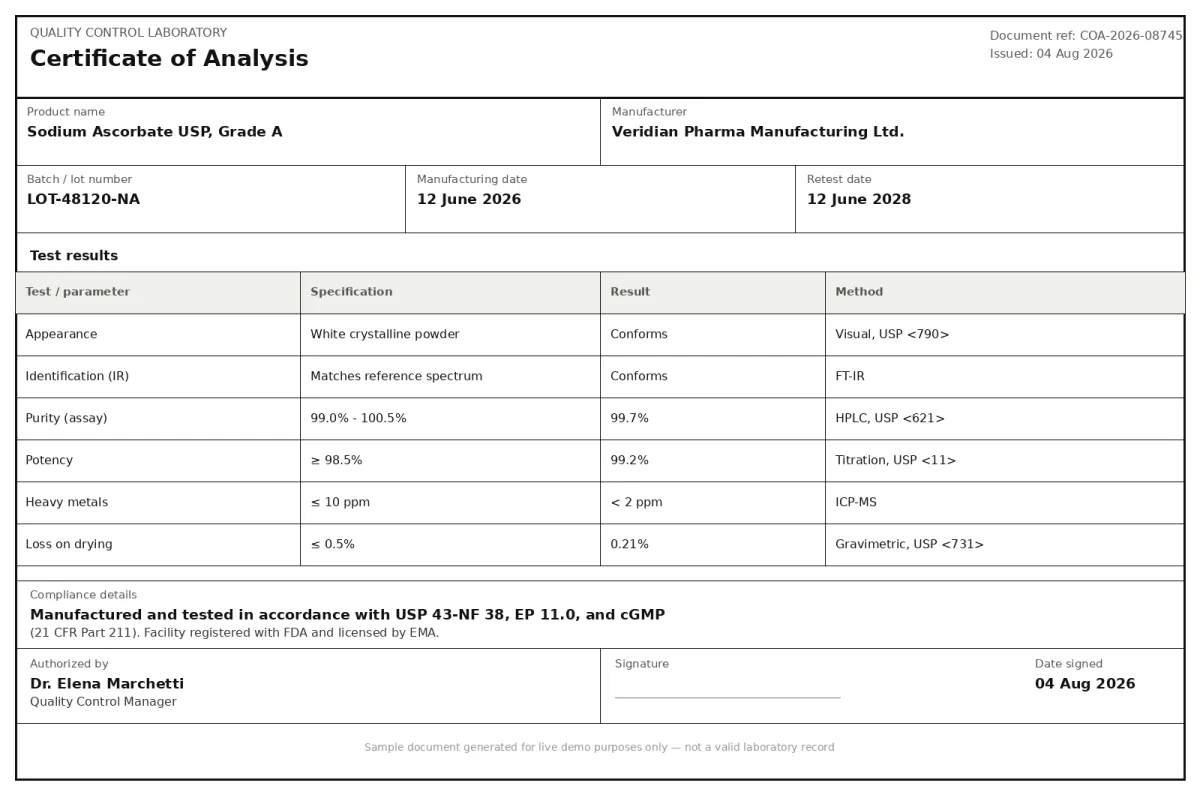
Select a document and press Parse
Want to run it on your own documents?
Ready to dive in? Request a key to get started.Business advantages
- No template configuration, works with the common COA layouts out of the box
- Sub-second processing per document at scale
- End-to-end encryption and GDPR compliance for sensitive quality data
- REST API with Python SDK for straightforward integration into existing QC systems
Frequently asked questions
How is ByteIt's COA extraction priced?
ByteIt uses simple, usage-based pricing with a free tier to get started, including full VLM extraction, table parsing, and JSON export. Higher-volume plans add parallel processing and team API keys, and Enterprise plans offer custom pricing for high-volume or dedicated-deployment needs. See the pricing page on byteit.ai for current plans and rates.
How do I integrate COA extraction into my existing systems?
ByteIt provides a REST API and a Python SDK. You send the COA document (PDF, image, or Word) to the API endpoint and receive structured JSON in response. The extracted data can then be routed into your LIMS, ERP, or connected to workflow automation tools such as n8n, Zapier, or Make.
What file formats are supported for Certificate of Analysis documents?
ByteIt accepts PDF, Word (DOCX), Excel (XLSX), and image formats including JPG and PNG. This covers both digital-native COAs and scanned paper certificates.
How does the engine handle low-quality scans or handwritten entries on COAs?
The extraction engine uses vision-language models that read the document's layout directly, not just OCR text layers. This means it can interpret COAs from scanned copies, faxed documents, and even those with handwritten signatures or stamped approval marks, as long as the printed data is legible.
Does it extract line-item test results from the analysis table?
Yes. COAs typically contain a multi-row table listing each test parameter, its specification range, the actual result, and a pass/fail indication. ByteIt extracts each row as structured data, preserving the relationship between test name, specification, result, and status.
Can ByteIt handle multi-page COAs?
Yes. COAs often run to multiple pages, especially when they cover numerous test parameters or include supplementary documentation. ByteIt processes multi-page documents as a single extraction, returning all fields and table data in one structured JSON output.
What makes COA extraction different from standard invoice or receipt OCR?
COAs contain test result tables where the context matters: the specification is a range or limit, the result is a measured value, and the status is pass or fail. Standard OCR that just reads raw text cannot preserve that relational structure. ByteIt's extraction engine understands the document's layout and returns fields grouped by section (product details, test results, compliance info) so the output is immediately usable in quality workflows.