
Benefits
Eliminate manual data entry from bank statements, significantly reducing per-statement processing time and freeing finance teams for higher-value work.
Cut operating costs significantly by replacing human keying with automated extraction that runs at scale, from a handful of statements to thousands per month.
Accelerate lending, mortgage, and credit-decisioning workflows by feeding validated transaction data directly into underwriting systems within seconds of upload, with a human review step for high-stakes decisions.
Improve audit readiness and compliance by maintaining a complete, timestamped extraction log for every statement processed, with no data left in unstructured PDFs.
How it works
- Step 1
Upload
Send the document to the API as a file or a URL no special formatting required.
- Step 2
The engine reads the document
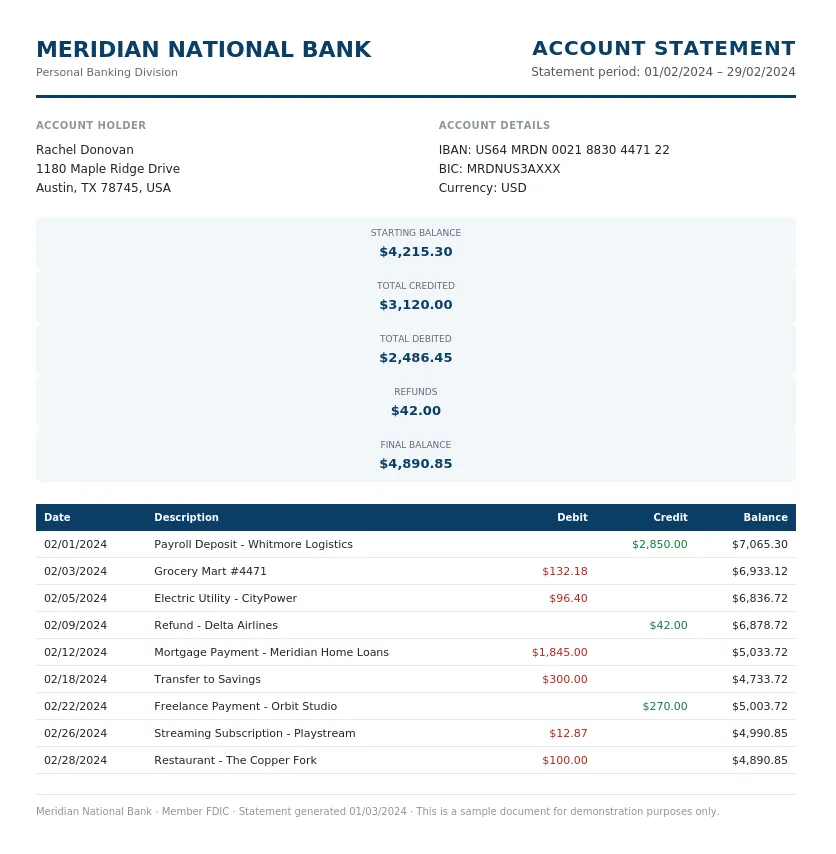
The engine analyzes the page layout and identifies the content that matters. The extraction engine reads both the header block and the full transaction table of any bank statement, native PDF or scanned, identifying account metadata, statement dates, running balances, and every individual transaction row without requiring a predefined template.
- Step 3
Structured JSON is returned
Every extracted element comes back as structured JSON, positioned and typed, ready to feed into downstream systems.
- Step 4
Confidence-based review
Each field carries a confidence score, so low-confidence results can be routed for human review instead of trusted blindly.
Example fields
A sample of what extraction can return, and many more when they appear on the document.
Features
Extracts statement-level fields such as bank name, BIC, IBAN, account holder name and address, statement period, opening and closing balances, totals credited and debited, and many more.
Parses full transaction tables with date, description, debit and credit amounts, running balance, refunds, and currency, even from statements without visible gridlines.
Accepts PDF, JPG, PNG, TIFF, and other standard formats, both native digital files and scanned or photographed paper statements.
Performs automatic balance reconciliation, flagging statements where opening balance plus total credits minus total debits does not equal the closing balance.
Supports multi-page statements, detecting account boundaries and statement period breaks across long documents without manual splitting.
Use cases
Loan and mortgage underwriting
Lending teams receive hundreds of bank statements from applicants each week. ByteIt extracts income deposits, recurring debits, and running balances from every statement and outputs structured JSON. The data can be piped directly into underwriting engines or loan origination systems via API, removing manual income verification and reducing decision cycles significantly, with human review on final lending decisions.
Account reconciliation for finance teams
Finance departments reconcile bank statements against internal ledgers monthly. ByteIt's extraction engine reads every transaction row and balance summary from the statement and flags mismatches through built-in balance reconciliation checks. The structured output can be exported to CSV or JSON and fed into accounting software for automated matching against book entries.
KYC and financial compliance checks
Compliance teams need to verify income sources, detect unusual transaction patterns, and maintain audit trails. ByteIt extracts account holder details, transaction histories, and aggregate totals from customer-submitted statements. The structured data integrates with compliance dashboards and case-management tools through workflow automation platforms such as n8n, Zapier, or Make, with a human review step for sanctions and AML decisions.
Personal finance and budgeting automation
Fintech apps and budgeting platforms ingest user bank statements to categorise spending, track cash flow, and generate financial insights. ByteIt's API converts statement PDFs into transaction-level structured data that can be pushed into categorisation engines, spending analytics dashboards, or personal financial management tools.
Debt collection and credit management
Collection agencies and credit management firms process bank statements to assess repayment capacity and verify income. ByteIt extracts salary credits, regular debits, and running balances from submitted statements, enabling automated affordability assessments and compliant collection workflows, with a human review step for consequential credit decisions.
LIVE DEMO
Try it yourself
Upload a sample bank statement in PDF, JPG, or PNG format and see the extracted fields, account metadata, transaction table, and balance summaries, returned as structured JSON in seconds.
Select a document and press Parse
Want to run it on your own documents?
Ready to dive in? Request a key to get started.Business advantages
- Self-learning engine improves accuracy over time without manual retraining.
- No templates needed, handles most common bank layouts and languages.
- Balance reconciliation and duplicate detection built in by default.
- Export to JSON, CSV, XML, or connect via REST API and webhooks.
Frequently asked questions
What file formats does the Bank Statement OCR API support?
ByteIt accepts PDF (both native and scanned), JPG, PNG, TIFF, and BMP. The engine automatically detects whether the file is a digital PDF with selectable text or a scanned image and applies the appropriate extraction pipeline.
Can it handle multi-page bank statements?
Yes. The engine processes multi-page PDFs and images, detects account boundaries and statement period breaks, and returns page-level metadata alongside the consolidated extraction. There is no need to split the document before upload.
How does the API handle low-quality scans or photos of bank statements?
ByteIt applies preprocessing steps such as deskewing, contrast enhancement, and noise reduction before OCR. While a clear scan yields the best results, the engine is trained on varied-quality data and can extract usable information from moderately skewed, faded, or photographed statements.
Does the extraction include balance reconciliation?
Yes. The engine performs an automatic check: opening balance plus total credits minus total debits should equal the closing balance. Statements that do not reconcile are flagged so your team can investigate discrepancies without manually rechecking every row.
How do I integrate the Bank Statement API into my workflow?
ByteIt exposes a REST API. You can send documents via direct HTTP requests or use workflow automation tools such as n8n, Zapier, or Make to connect the output to your accounting system, lending platform, or compliance dashboard. Webhooks are available for asynchronous processing.
Can I export the extracted data to Excel or CSV?
Yes. The API returns structured JSON by default, which you can convert to CSV, Excel, or XML. The data is organised into statement-level fields and a transaction table, making it straightforward to load into spreadsheets or accounting software.
What languages and regional formats are supported?
The engine reads bank statements in multiple languages and alphabets, covering US, EU, and UK statement formats. It handles date formats, currency symbols, and decimal separators from different regions without manual configuration.
Related documents
Invoice
Extract invoice number, vendor data, line items, VAT, and totals from PDF invoices, scanned invoices, and receipt images with ByteIt's invoice data extraction API.
Receipt
Extract merchant name, line items, totals, VAT, and payment method from receipts with ByteIt's AI receipt parser. No templates, no training – just structured JSON from most common receipt formats.