
Benefits
Reduce manual data entry from BoL documents across ocean, road, and multimodal shipments.
Catch misread container numbers and seal IDs before they reach your TMS or customs filings.
Process straight BOLs, ocean bills, master and house BOLs, airwaybills, and delivery notes with one engine.
Route extracted shipping data directly into your logistics platform or ERP without rekeying.
How it works
- Step 1
Upload
Send the document to the API as a file or a URL no special formatting required.
- Step 2
The engine reads the document
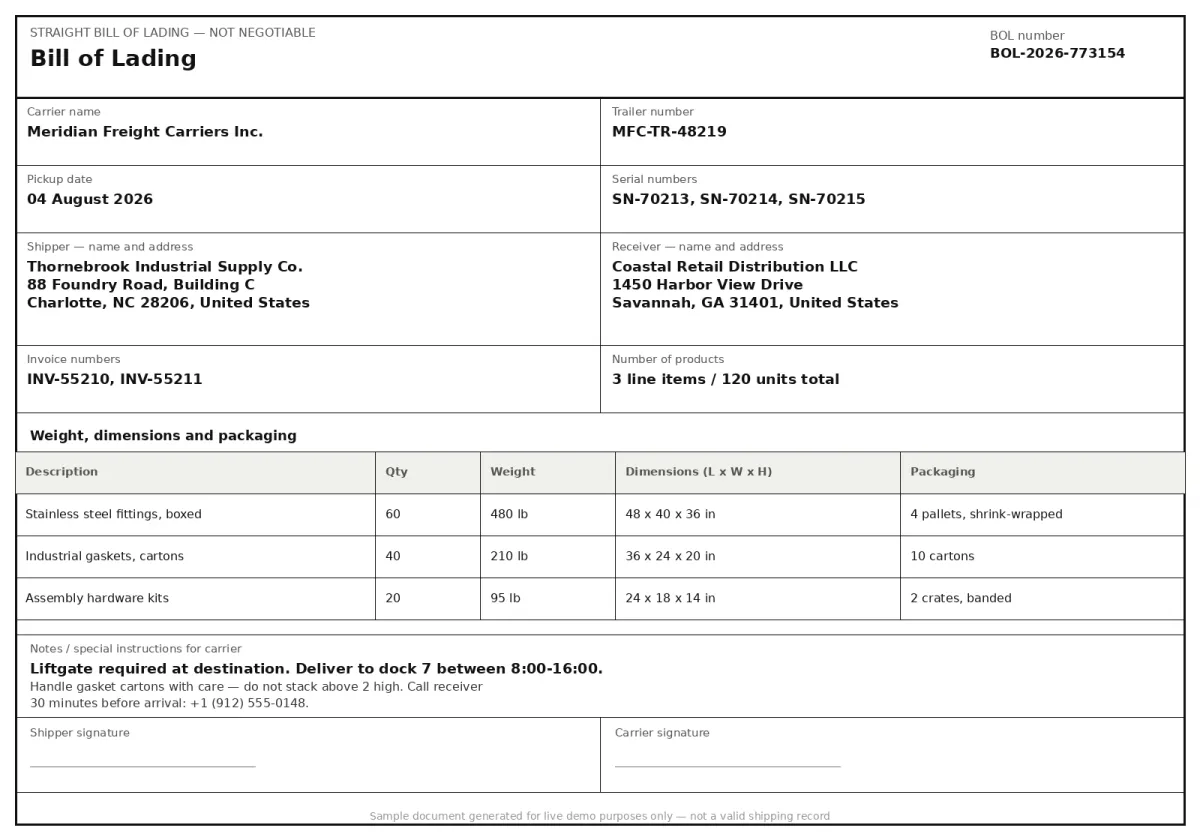
The engine analyzes the page layout and identifies the content that matters. The extraction engine reads bills of lading and related shipping documents, parsing carrier names, consignee and shipper addresses, container and seal numbers, product weights and dimensions, and any special instructions written on the document.
- Step 3
Structured JSON is returned
Every extracted element comes back as structured JSON, positioned and typed, ready to feed into downstream systems.
- Step 4
Confidence-based review
Each field carries a confidence score, so low-confidence results can be routed for human review instead of trusted blindly.
Example fields
A sample of what extraction can return, and many more when they appear on the document.
Features
Detects and extracts Bill of Lading Number, Carrier Name, Trailer Number, Serial Numbers, and container IDs from any page region.
Reads shipper and receiver names and addresses, pickup dates, and carrier instructions across varied carrier layouts.
Extracts product-level details such as number of products, weight, dimensions, packaging, and many more, line by line.
Supports PDF, JPG, PNG, and TIFF input files, single-page or multi-page BoL documents.
Works in English and German, with document layouts from carriers in the EU, US, and international trade lanes.
Use cases
Automated Freight Audit and Payment
Extract carrier name, BoL number, pickup date, weight, and dimensions from inbound BoL documents to verify carrier invoices against original shipment data before releasing payment. Flag discrepancies in container counts or freight charges without manual file-by-file comparison.
TMS Onboarding Without Templates
Feed extracted BoL fields straight into a transport management system, carrier name, trailer number, pickup and delivery locations, without maintaining coordinate-based templates for each carrier's document layout. When a carrier updates their form, the extraction continues reading the semantic fields unchanged.
Multi-Modal Shipment Tracking
Combine data from ocean bills, airwaybills, and road delivery notes into a single shipment record. Extract container IDs, vessel names, voyage numbers, and inland routing instructions from BoL documents to give logistics coordinators end-to-end visibility without manual consolidation.
Cross-Border Customs Data Preparation
Connect extracted Bill of Lading fields such as weights, container IDs, and freight terms into your ERP or logistics platform using workflow automation tools like n8n, Zapier, or Make. Trigger automated inventory updates, shipment status notifications, or invoice matching as soon as a BoL is processed.
LIVE DEMO
Try a Bill of Lading extraction now
Upload a sample BoL document (PDF, JPG, or PNG) or use one of our pre-loaded shipping documents to see structured data extracted in seconds.
Select a document and press Parse
Want to run it on your own documents?
Ready to build on this extraction? Get your API key in Studio.Business advantages
- No templates, one semantic model handles the common BoL carrier layouts.
- Validates container IDs against ISO 6346 check digits during extraction.
- Works in production without requiring further document training.
- Continuous learning from human feedback improves straight-through processing rates.
Frequently asked questions
How does the Bill of Lading extraction handle different BoL types like straight, order, and ocean bills?
The engine is trained on a wide range of BoL document variants used in international trade, straight bills, order bills, ocean bills, multimodal transport documents, airwaybills, and delivery notes. It reads the common semantic fields shared across these types rather than relying on a fixed layout, so a new carrier format is handled without template changes.
Can it extract container numbers and seal numbers from low-quality scans or faxed BoL copies?
Yes. The model was trained on digitised shipping documents including scanned and faxed copies that often have uneven contrast, skew, or handwritten marks. It identifies container numbers and seal numbers by semantic context and validates them against standard formats like ISO 6346 for containers.
What pricing model does the Bill of Lading extraction API use?
ByteIt offers a credit-based consumption model for the Bill of Lading extraction endpoint and custom-trained extractors. Each document processed consumes credits. You can find current pricing details and plan options on the ByteIt pricing page. A free trial with a limited number of documents is available to test the extraction on your own BoL files.
What file formats are supported for BoL document upload?
The API accepts PDF, JPG, PNG, and TIFF files. Multi-page PDFs are supported, with the engine processing all pages and extracting fields from the relevant sections across the document.
Can I integrate Bill of Lading extraction into my existing TMS or ERP system?
Yes. ByteIt provides a REST API and client SDKs that can be wired into your transport management system, ERP, or workflow tool. You can also connect BoL extraction output to downstream systems using no-code platforms like n8n, Zapier, or Make without writing custom integration code.
What languages does the BoL engine support?
The Bill of Lading extraction model is trained primarily on English-language documents, with additional support for German. Documents containing a mix of English terms and local language headers (common in international shipping) are handled by the engine's multilingual text recognition layer.
Does it extract line-item level data such as product descriptions, quantities, and weights?
Yes. The engine reads the cargo line items from the BoL, product descriptions, quantities, weights, dimensions, and packaging details, and structures them as individual rows. This is useful for populating shipment manifests or customs declarations without manual transcription of each item row.
Related documents
T1 T2 Documents
Extract structured data from EU T1 and T2 customs transit documents. Capture sender and recipient details, package counts, weights, seals, tariff numbers, and more.
Certificate Of Analysis
Extract structured data from Certificates of Analysis (COA) with ByteIt's AI engine. Capture batch numbers, test results, specifications and compliance details from PDFs and images.