
Benefits
Eliminate manual keying of PO data, reducing entry errors and freeing procurement teams for higher-value work
Process purchase orders in seconds instead of minutes, accelerating the procure-to-pay cycle
Handle POs from most suppliers without template maintenance or rule configuration
Deliver clean, structured data directly into ERP systems, accounting tools, and procurement platforms
How it works
- Step 1
Upload
Send the document to the API as a file or a URL no special formatting required.
- Step 2
The engine reads the document
The engine analyzes the page layout and identifies the content that matters. The engine reads the entire purchase order layout, identifying and extracting both top-level metadata (PO number, dates, supplier and buyer information, shipping address, payment terms, currency, subtotal, tax, and total) and the table of line items (description, quantity, unit price) from any position on the page.
- Step 3
Structured JSON is returned
Every extracted element comes back as structured JSON, positioned and typed, ready to feed into downstream systems.
- Step 4
Confidence-based review
Each field carries a confidence score, so low-confidence results can be routed for human review instead of trusted blindly.
Example fields
A sample of what extraction can return, and many more when they appear on the document.
Features
Extracts header fields (PO number, date, supplier and buyer details, shipping and billing addresses, payment terms) plus line-item tables (description, quantity, unit price, total)
Reads digitally born PDFs, scanned images, and photographs of purchase orders with consistent accuracy
Supports multi-page purchase orders, capturing data across page boundaries
Returns results in structured JSON via a REST API, ready for downstream integration
Use cases
Automated PO data entry into ERP and accounting systems
Your procurement team receives dozens of POs from different departments each day. ByteIt extracts the PO number, vendor details, line items, and totals, then sends the structured data into your ERP (Enterprise Planning) or accounting software via a workflow automation tool such as n8n, Zapier, or Make. Purchase orders are recorded, approved, and tracked without anyone typing a line.
Three-way matching for accounts payable
In a typical procure-to-pay cycle, the accounts payable team must match the purchase order against the corresponding goods receipt and invoice. ByteIt's PO extraction captures item-level data (quantities, prices, tax) so your AP automation system can perform three-way matching automatically, flagging discrepancies for review and accelerating payment approvals.
Inventory and supply chain planning
Procurement managers need visibility into incoming stock to plan inventory levels and avoid stock-outs. By extracting line-item quantities and delivery dates from purchase orders in real time, ByteIt feeds supply chain planning tools with accurate, up-to-the-minute data on what goods are on order and when they are due to arrive.
Spend analysis and procurement analytics
Finance teams can aggregate data from thousands of historical purchase orders to understand spending patterns by department, supplier, or product category. ByteIt converts paper and PDF POs into structured records that can be loaded into a data warehouse or analytics dashboard, enabling cost-saving decisions backed by complete data.
Cross-border PO processing in multiple currencies
International procurement involves POs in different currencies, tax regimes, and date formats. ByteIt extracts currency, VAT rates, and delivery terms across common regional formats, making it straightforward to standardise purchase order data from global suppliers into a single enterprise system.
LIVE DEMO
Try it yourself
Test extraction on a sample purchase order or upload your own PO file in PDF, JPG, or PNG format to see the structured output in real time.
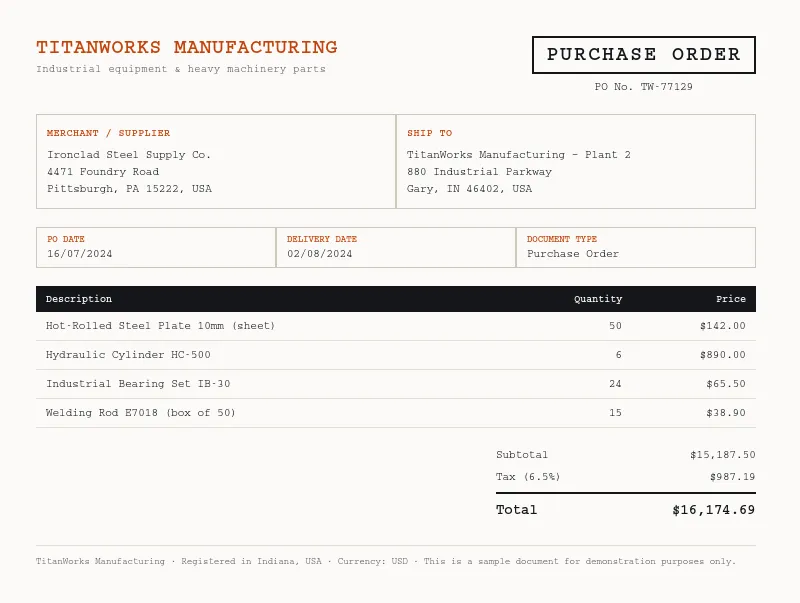
Select a document and press Parse
Want to run it on your own documents?
Ready to dive in? Request a key to get started.Business advantages
- Works with most common PO layouts, no templates needed
- Returns structured JSON in seconds
- Secure processing with end-to-end encryption
- REST API with straightforward integration
Frequently asked questions
How does ByteIt handle purchase orders with different layouts from different suppliers?
ByteIt uses an AI model trained on a broad range of purchase order formats, not a fixed template. It reads the document's layout dynamically, so whether a PO comes from a global ERP system or a small supplier's handwritten form, the engine identifies and extracts the relevant fields without manual rules or template configuration.
Can it extract line items from complex PO tables?
Yes. The engine handles line-item tables with merged cells, multi-line descriptions, nested headers, and varying column orders. Each row's description, quantity, unit price, and line total are extracted and returned as a structured array, preserving the relationship between items.
What file formats are supported for purchase order extraction?
ByteIt accepts PDF (both digitally native and scanned), JPEG, PNG, and TIFF files. Multi-page documents are supported, and all pages are processed together to capture the complete PO data.
How is the API integrated into an existing procurement or accounting workflow?
The extraction engine is accessed via a standard REST API. You can send purchase orders to the endpoint and retrieve structured JSON results. The API can be wired into workflow automation tools such as n8n, Zapier, or Make to push extracted PO data directly into ERPs, accounting platforms, or databases.
What is the pricing model for PO extraction?
ByteIt offers a free tier for testing and evaluation, plus pay-as-you-go and subscription plans that scale with your document volume. Visit the pricing page for current rates, quotas, and enterprise options.
Does the engine handle POs in languages other than English?
Yes. The model supports multiple languages commonly found in US and European procurement documents, extracting field values across these languages.
How accurate is the extraction for low-quality scans or photographs of purchase orders?
The engine is trained on real-world document variations including folded pages, uneven lighting, and moderate blur. While very poor-quality scans may reduce confidence on certain fields, the model generally produces reliable results across a wide range of input quality levels.
Related documents
Invoice
Extract invoice number, vendor data, line items, VAT, and totals from PDF invoices, scanned invoices, and receipt images with ByteIt's invoice data extraction API.
Receipt
Extract merchant name, line items, totals, VAT, and payment method from receipts with ByteIt's AI receipt parser. No templates, no training – just structured JSON from most common receipt formats.
Bank Statement
Extract account holder, IBAN, transaction dates, debit/credit amounts, and balances from PDF and scanned bank statements with ByteIt's OCR API.