
Benefits
Reduce customs entry filing time by eliminating manual data entry from SAD forms, CN22/CN23 labels, and commercial invoices
Lower the risk of penalties and border holds caused by miskeyed HS tariff codes, declared values, or country-of-origin fields
Scale import and export operations without adding headcount, process hundreds of declarations per day through a single API
Maintain an auditable trail of extracted data for compliance reviews and customs broker validation workflows
How it works
- Step 1
Upload
Send the document to the API as a file or a URL no special formatting required.
- Step 2
The engine reads the document
The engine analyzes the page layout and identifies the content that matters. ByteIt's engine reads customs declaration documents, including SAD/C88 forms, CN22/CN23 customs labels, and supporting trade paperwork, and extracts structured data such as document type codes, importer and exporter information, HS tariff numbers, quantities, weights, declared values, line item details, and country of origin.
- Step 3
Structured JSON is returned
Every extracted element comes back as structured JSON, positioned and typed, ready to feed into downstream systems.
- Step 4
Confidence-based review
Each field carries a confidence score, so low-confidence results can be routed for human review instead of trusted blindly.
Example fields
A sample of what extraction can return, and many more when they appear on the document.
Features
Extracts document type identifiers (e.g. CN22, C88), declaration numbers, and form-specific box fields from customs forms
Reads importer and exporter details including name, address, VAT/EORI registration numbers, and country references
Captures commodity-level line item detail: HS tariff numbers, quantities, weights, declared values, and goods descriptions
Handles both structured box-based layouts (SAD/C88) and free-text label formats (CN22, CN23) from the same engine
Accepts digital PDFs, scanned paper declarations, and image files (JPG, PNG) with consistent extraction accuracy
Returns structured JSON ready to be forwarded to customs filing systems, ERPs, or workflow automation pipelines
Use cases
Automated customs entry filing for freight forwarders
A freight forwarder receives hundreds of SAD/C88 forms and commercial invoices per week. ByteIt extracts declared values, HS codes, and consignee details from each document and formats the data as structured JSON. The output is pushed directly into the forwarder's customs filing software (CDS, AES, or ACE), cutting data entry time per shipment from minutes to seconds and reducing transcription errors — always verified by a human before submission.
E-commerce cross-border compliance for marketplace operators
Online marketplaces and consolidators shipping internationally must attach CN22 or CN23 customs labels to parcels and submit electronic customs data to destination countries. ByteIt extracts the sender and recipient details, item descriptions, quantities, weights, and values from each declaration label, enabling efficient submission to customs authorities with human review before filing, and reducing the risk of parcels being held at the border.
Customs broker invoice and packing list reconciliation
Customs brokers receive a packet of documents for every shipment: a commercial invoice, packing list, and bill of lading. ByteIt extracts the declared customs value, country of origin, and HS tariff numbers from the invoice and cross-references quantities and weights from the packing list. The structured output feeds a validation workflow that flags discrepancies before the entry is filed, reducing the broker's review time per shipment.
Multi-country trade compliance reporting for global manufacturers
A manufacturer importing raw materials across six jurisdictions files customs declarations with different regulatory bodies, HMRC (UK), EU CDS, and US CBP. ByteIt extracts the relevant data elements from each country's declaration format and consolidates them into a single structured dataset. The data is then connected to a compliance dashboard or ERP via workflow automation tools (n8n, Zapier, or Make), giving the trade compliance team a real-time view of duty spend, origin rules, and filing accuracy.
Duty drawback and post-entry audit support
Companies claiming duty drawback or undergoing a post-entry customs audit must produce accurate records of every declaration filed, including tariff codes, declared values, and supporting documentation. ByteIt extracts and preserves the full data set from each customs declaration in structured format, making it searchable and retrievable on demand. The audit trail can be exported directly into the company's compliance management system without manual re-keying.
LIVE DEMO
Try customs declaration extraction yourself
Upload a sample customs declaration, PDF, JPG, or PNG, and see the engine extract HS codes, declared values, parties, and line items into structured JSON in seconds.
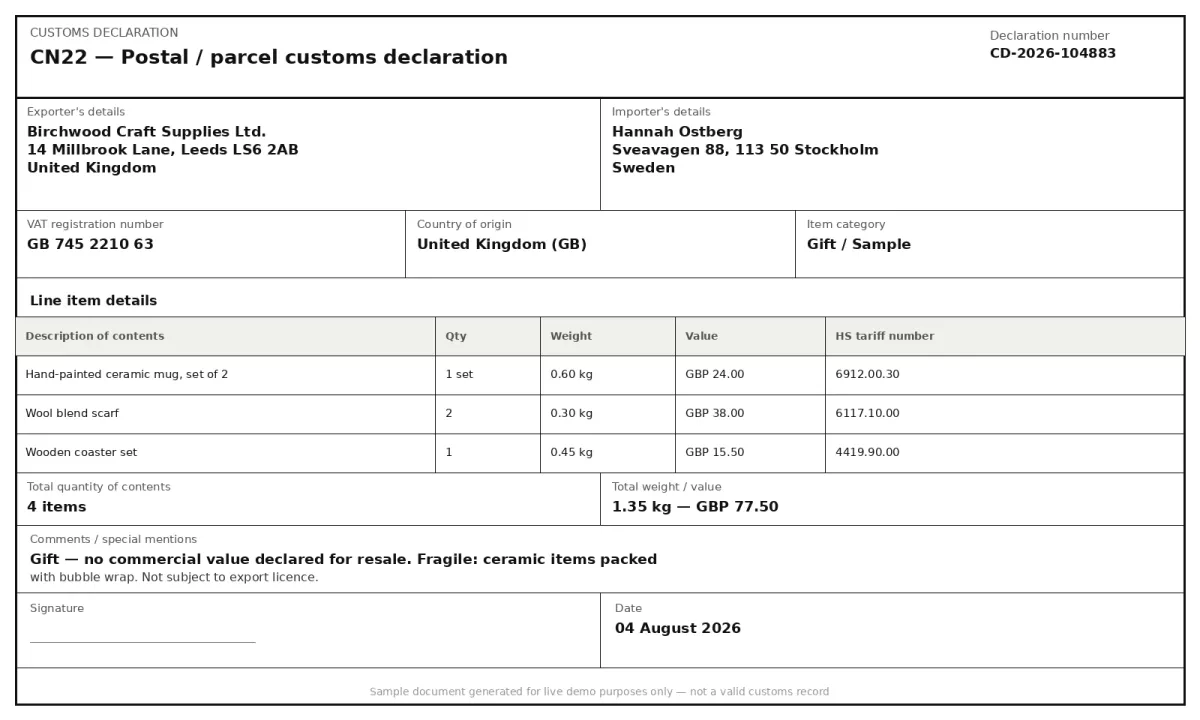
Select a document and press Parse
Want to run it on your own documents?
Ready to automate your customs documentation? Get your API key in Studio.Business advantages
- Pay only for what you process, usage-based pricing with no minimum commitment
- GDPR-compliant data handling with end-to-end encryption
- Sub-second processing per page; suitable for high-volume import and export pipelines
- Rest API with Python SDK, designed to drop into existing trade and logistics stacks
Frequently asked questions
Which customs declaration formats does ByteIt support?
ByteIt supports the most common customs declaration formats including the Single Administrative Document (SAD/C88) used in the UK and EU, CN22 and CN23 customs labels for postal and courier shipments, and the associated paperwork that accompanies them, commercial invoices, packing lists, and bills of lading. The engine handles both box-based structured layouts and free-text label formats.
Can ByteIt extract HS tariff codes from customs declarations?
Yes. ByteIt extracts HS tariff numbers (Harmonized System codes) from customs declarations wherever they appear in the document, whether in a dedicated box on a SAD form, a line item on a commercial invoice, or a commodity description on a CN23 label. The extracted code is returned as a structured field ready for downstream validation or filing.
What file formats are accepted?
ByteIt accepts PDF (including scanned paper documents), JPG, and PNG files. If your declaration was issued as a digital PDF, it is processed directly. If it is a photocopy or a scan of a paper form, the engine still extracts the key fields provided the image is legible.
How can I integrate ByteIt into my customs filing workflow?
ByteIt exposes a REST API that returns structured JSON. You can integrate it directly into your customs filing software or middleware using the Python SDK or standard HTTP requests. For no-code connectors, the output can be routed through workflow automation tools (n8n, Zapier, or Make) to populate your CDS, ACE, or ERP system.
Does ByteIt handle multi-page customs declarations?
Yes. Multi-page SAD/C88 declarations and multi-page CN23 labels are processed as a single document. Each page is parsed sequentially, and the extracted fields are consolidated into one structured output so you do not have to merge results manually.
How much does the API cost?
ByteIt operates on a pay-as-you-go model with a free tier that includes credits for your first API calls. After the free quota, you are billed per page processed, typically a few cents per page, with volume discounts available on higher-usage plans. There is no monthly minimum commitment.
What accuracy can I expect for scanned or low-quality declarations?
ByteIt's engine uses context-aware extraction that interprets document layout and field semantics rather than relying solely on raw OCR text. This means it can still extract key fields, document type, HS code, declared value, parties, from scanned or low-resolution SAD forms and CN labels, provided the text is broadly legible. The confidence level varies with scan quality, but the engine is designed to degrade gracefully rather than produce incorrect output.
Related documents
T1 T2 Documents
Extract structured data from EU T1 and T2 customs transit documents. Capture sender and recipient details, package counts, weights, seals, tariff numbers, and more.
Bill Of Lading
Extract structured data from bills of lading, shipper, consignee, container IDs, cargo details, and routing. Supports ocean, road, and multimodal BOL formats.
Certificate Of Analysis
Extract structured data from Certificates of Analysis (COA) with ByteIt's AI engine. Capture batch numbers, test results, specifications and compliance details from PDFs and images.