
Benefits
Eliminate manual data entry from multi-page freight invoices with dense cost breakdowns and shipment references.
Speed up carrier payment and freight audit cycles by extracting charges, dates, and identifiers in seconds.
Reduce discrepancies between freight invoices and supporting documents such as bills of lading and packing lists.
Handle invoices from different freight forwarders, shipping lines, and customs brokers without template configuration.
How it works
- Step 1
Upload
Send the document to the API as a file or a URL no special formatting required.
- Step 2
The engine reads the document
The engine analyzes the page layout and identifies the content that matters. The extraction engine reads the hierarchical structure of freight invoices, distinguishing between header-level shipment metadata, line-item charge tables, and footer-level totals and tax lines, across layout variations between carriers.
- Step 3
Structured JSON is returned
Every extracted element comes back as structured JSON, positioned and typed, ready to feed into downstream systems.
- Step 4
Confidence-based review
Each field carries a confidence score, so low-confidence results can be routed for human review instead of trusted blindly.
Example fields
A sample of what extraction can return, and many more when they appear on the document.
Features
Extracts carrier name, bill-to details, VAT numbers, and receiver information from the header and footer sections of freight invoices.
Captures shipment identifiers including shipment ID, container ID, seal number, and origin address.
Parses line-item tables with quantity, unit price, discounts, and accessorial charges.
Extracts date fields such as issue date, due date, pickup date, delivery date, and many more.
Handles multi-page freight invoices, processing subtotals and running totals across pages.
Use cases
Freight audit and cost allocation
Extract every charge line, accessorial fee, and tax amount from freight invoices and cross-reference them against rate confirmations and contracts. Flag duplicate charges, incorrect accessorials, or rate discrepancies before approving payment. Allocate costs to the correct shipment, department, or customer code in your accounting system.
AP automation for logistics teams
Route extracted invoice data directly into your accounts payable workflow. Match carrier name, invoice number, and total amount against purchase orders or service entries. Automate approval routing based on predefined thresholds, and push approved invoices to your ERP for payment scheduling.
Multi-carrier reconciliation
Consolidate freight invoices from multiple carriers, forwarders, and shipping lines into a single structured dataset. Reconcile container IDs, seal numbers, and shipment IDs across invoices and supporting documents such as bills of lading and delivery orders. Generate exception reports for mismatched references or missing documentation.
Shipment cost analytics and budgeting
Aggregate extracted cost data across hundreds of freight invoices to build a historical view of shipping spend by lane, carrier, or commodity. Identify cost trends, seasonal spikes, and carrier pricing changes. Feed the structured data into a BI tool or dashboard for budgeting and procurement negotiation.
Integration with workflow automation tools
Send extracted freight invoice data to downstream systems using workflow automation platforms. Trigger a Slack or email notification when a high-value invoice exceeds a threshold, create a record in your TMS, or update a Google Sheet for team review. Connect to your ERP or accounting software using workflow automation tools like n8n, Zapier, or Make.
LIVE DEMO
Try freight invoice extraction yourself
Upload a sample freight invoice in PDF, JPG, or PNG format and see the extracted fields in real time.
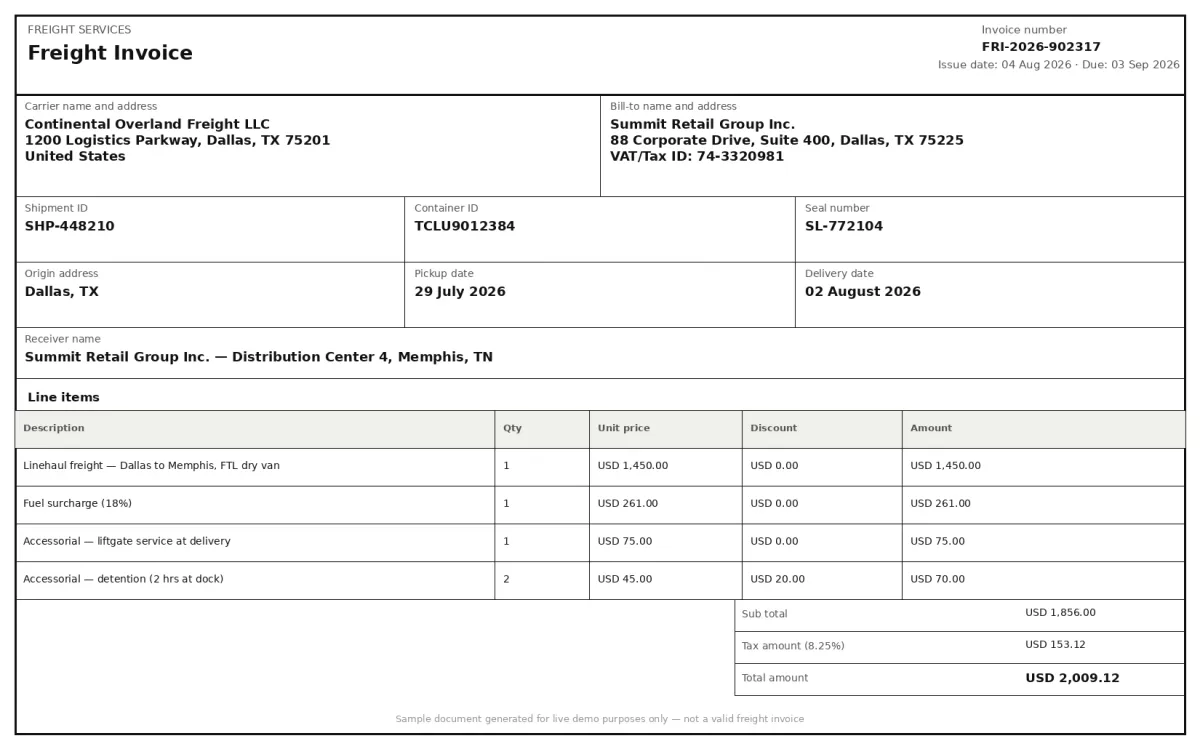
Select a document and press Parse
Want to run it on your own documents?
Ready to dive in? Request a key to get started.Business advantages
- No template configuration required for different carrier invoice layouts
- Handles multi-page invoices with subtotals and cross-page line items
- Works with PDF, JPG, PNG, and scanned document formats
- Structured output ready for ERP, TMS, or spreadsheet import
Frequently asked questions
What file formats does the freight invoice extraction API support?
The API accepts PDF, JPG, and PNG files. It processes both native digital PDFs and scanned images of printed freight invoices. Multi-page PDFs are handled as a single document, with subtotals and line items captured across pages.
Can it handle freight invoices with multiple currencies on the same document?
The engine reads all currency amounts present on the invoice and returns them as extracted values. Each charge line and total is returned with its original amount; currency classification is a downstream task you can implement on the extracted data using the currency symbols and codes the engine captures.
How accurate is the extraction for low-quality scans or blurred faxes?
The engine includes image preprocessing steps such as deskewing, contrast adjustment, and noise reduction before running extraction. It performs well on typical office scans and digital PDFs. Extraction quality on heavily damaged or low-resolution faxes will depend on the legibility of the original document.
Does it extract line items and accessorial charges separately?
Yes. The engine identifies line-item tables and extracts each row including description, quantity, unit price, and total. Accessorial charges such as fuel surcharges, terminal handling fees, and customs clearance fees are captured individually within the line-item structure.
What shipment identifiers can the engine extract from a freight invoice?
It extracts shipment ID, container ID, seal number, origin address, pickup date, and delivery date. These identifiers can be used to cross-reference freight invoices with other logistics documents such as bills of lading, packing lists, and proof of delivery.
How do I integrate the freight invoice extraction into my existing workflow?
ByteIt provides a REST API. You can send documents via API calls, or use workflow automation tools to connect the extraction output to your ERP, TMS, accounting software, or spreadsheets without writing custom integration code.
Related documents
Bill Of Lading
Extract structured data from bills of lading, shipper, consignee, container IDs, cargo details, and routing. Supports ocean, road, and multimodal BOL formats.
Proof Of Delivery
Extract recipient name, signature, delivery date and location from signed PODs. Automate proof of delivery data capture from PDFs, scans and photos.
Delivery Notes
Extract delivery dates, item quantities, recipient details, and proof of delivery signatures from any delivery note or POD. No templates, no manual entry.
Custom Declarations
Extract structured data from customs declarations, SAD (C88), CN22, CN23, and other import/export forms. HS codes, declared values, parties, and line items from PDFs and scans.