
Benefits
Eliminate manual transcription of shift data, process parameters, and waste reporting from paper control sheets into ERP and MES systems
Reduce data entry errors on quantities, part numbers, and start/finish times that cause production delays and rework
Speed up end-of-shift handovers by making control sheet data available digitally within seconds of the sheet being produced
Enable real-time visibility into job progress, quality exceptions, and maintenance reminders without someone reading each sheet
How it works
- Step 1
Upload
Send the document to the API as a file or a URL no special formatting required.
- Step 2
The engine reads the document
The engine analyzes the page layout and identifies the content that matters. The engine reads manufacturing control sheets across common layouts, identifying and extracting job metadata, process parameters, shift logs, time records, waste and scrap data, instructions, and approval fields from both typed and handwritten content.
- Step 3
Structured JSON is returned
Every extracted element comes back as structured JSON, positioned and typed, ready to feed into downstream systems.
- Step 4
Confidence-based review
Each field carries a confidence score, so low-confidence results can be routed for human review instead of trusted blindly.
Example fields
A sample of what extraction can return, and many more when they appear on the document.
Features
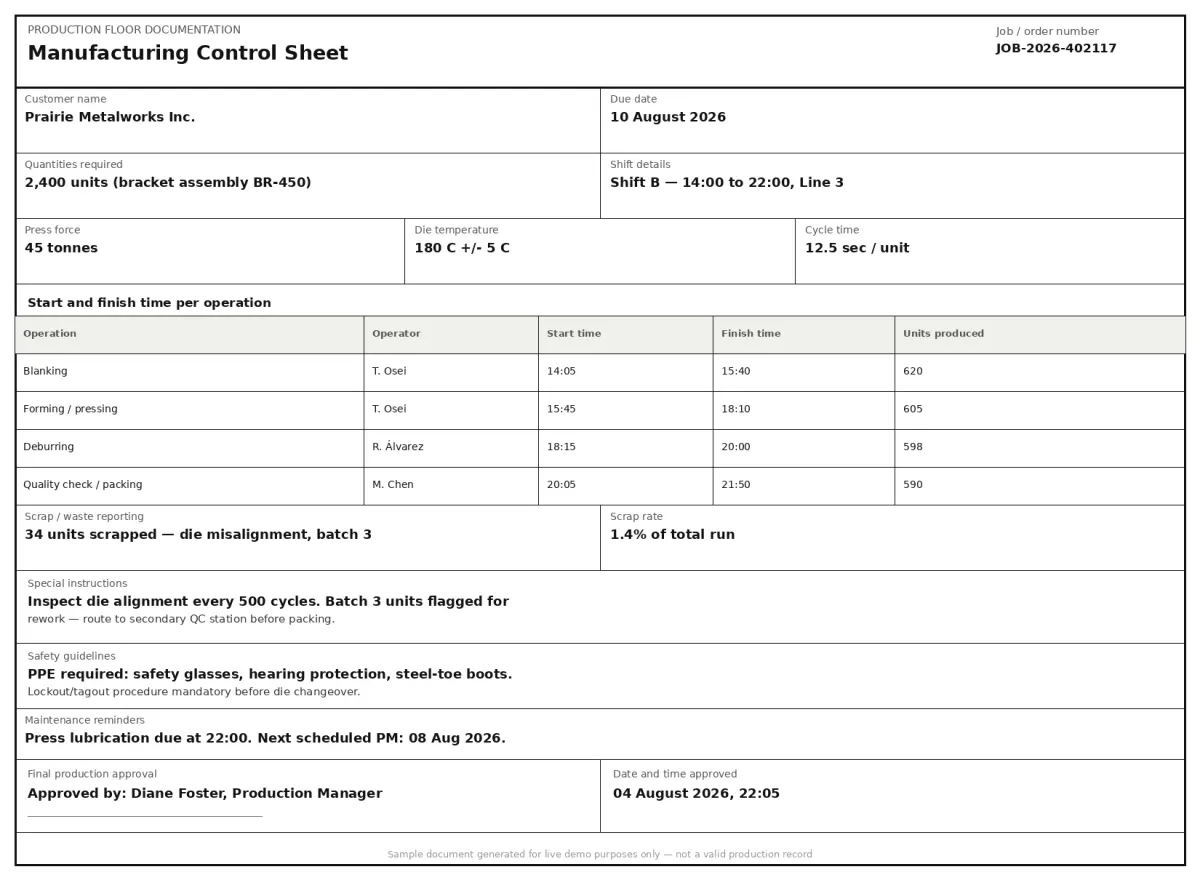
Extracts fields from scanned and digital control sheets such as job/order number, customer name, due date, quantities required, process parameters, and many more.
Reads shift details, start and finish times per operation, and scrap/waste reporting from table structures on the sheet
Captures special instructions, safety guidelines, maintenance reminders, and final production approval as structured text fields
Routes each control sheet to the optimal extraction model automatically, handling handwritten entries and variable template formats across different production lines
Returns clean JSON output that integrates directly into production dashboards, MES platforms, and quality management systems
Use cases
Automated MES data entry from shop floor control sheets
A manufacturer collects paper control sheets at the end of each shift across three production lines. Instead of having a data entry operator type job numbers, quantities, times, and scrap percentages into the MES manually, ByteIt extracts and pushes the data directly. The MES receives structured records within seconds, operators reclaim hours of clerical work, and the production dashboard reflects actual progress by shift.
Quality exception tracking with scrap and waste reporting
Quality engineers need to track scrap rates, defect quantities, and waste per job to identify process drift. ByteIt pulls scrap and waste reporting fields from control sheets along with the associated job numbers and shift details. The data feeds a quality analytics dashboard that flags when scrap exceeds a threshold for a given process parameter, enabling corrective action before the next batch runs.
End-of-shift handover with digital time logs
Shift supervisors complete control sheets with start and finish times for each operation. ByteIt extracts these time logs and pushes them into a handover system. The incoming shift sees exactly which jobs ran late, which operations overran, and where maintenance reminders were left by the previous team. Handover meetings shrink from 30 minutes of reading paperwork to 5 minutes of reviewing structured data.
ERP integration via workflow automation tools
Control sheet data does not live in isolation it needs to reach the ERP for job costing, inventory deduction, and production reporting. ByteIt outputs JSON that can be passed to an ERP system using workflow automation tools such as n8n, Zapier, or Make. A typical flow: ByteIt extracts the completed control sheet, a workflow node maps quantities and scrap data to the corresponding job in the ERP, and the production order is automatically closed out.
Compliance audit trail for regulated production
Industries such as aerospace, medical devices, and automotive require traceability of every production step. Control sheets carry shift details, operator approvals, and safety guideline acknowledgements that must be preserved for audits. ByteIt extracts these fields into a structured archive that can be searched, filtered, and exported on demand, replacing the need to pull paper files from storage when an auditor arrives.
LIVE DEMO
Try extraction on a manufacturing control sheet
Upload a sample PDF, JPG, or PNG of a manufacturing control sheet and see which fields ByteIt extracts, in real time.
Select a document and press Parse
Want to run it on your own documents?
Ready to digitise your shop floor? Request a key to get started.Business advantages
- Shop floor data hits your systems in seconds, not shifts
- Transcription errors on quantities, times, and scrap reduced at source
- Shift handovers become data-driven instead of paper-chasing
- Audit-ready digital records without scanning and filing
Frequently asked questions
What file formats does ByteIt accept for manufacturing control sheets?
ByteIt accepts PDF, Word (.docx), Excel (.xlsx), and common image formats including JPG, PNG, TIFF, and BMP. Both scanned paper sheets and born-digital control sheets are handled by the same pipeline.
How accurate is the extraction on handwritten control sheets?
The engine uses vision-language models capable of reading printed text, handwritten entries, and mixed typed/handwritten content common on factory control sheets. Accuracy depends on legibility, lighting of scans, and complexity of the layout, but the platform routes each document to the best extraction model for its characteristics.
Can I integrate control sheet extraction with my MES or ERP?
Yes. ByteIt returns structured JSON that can be passed to any downstream system. You can connect the output to your MES, ERP, or quality platform using workflow automation tools such as n8n, Zapier, or Make, or through direct API calls from your own integration layer.
How do I get started with the API?
Sign up for a free tier to test the API with your own documents. Install the Python SDK with 'pip install byteit', or use the REST API directly with cURL. Full documentation is available at byteit.ai/docs.
Does ByteIt handle multi-page control sheets?
Yes. ByteIt processes multi-page documents as a single extraction job, correlating fields across pages. A control sheet that spans several pages with continued shift logs or additional process parameters is treated as one coherent document.
What languages are supported for control sheet extraction?
ByteIt supports extraction across multiple languages commonly used in manufacturing documentation, including English, German, French, Spanish, Italian, Dutch, and Polish. Contact us to confirm support for specific language requirements.
Is my data secure when using ByteIt for production documents?
ByteIt provides end-to-end encryption for data in transit and at rest, with ISO 27001 certification and GDPR compliance. Data is hosted in the EU on German infrastructure. Enterprise plans offer zero data retention and on-premise or VPC deployment options.
Related documents
Delivery Notes
Extract delivery dates, item quantities, recipient details, and proof of delivery signatures from any delivery note or POD. No templates, no manual entry.
Packing Slips
Extract order numbers, shipped items, quantities, and tracking details from packing slips automatically. Remove manual data entry from your receiving workflow with ByteIt.
Certificate Of Analysis
Extract structured data from Certificates of Analysis (COA) with ByteIt's AI engine. Capture batch numbers, test results, specifications and compliance details from PDFs and images.
Advance Shipping Notices
Extract structured data from Advance Shipping Notices (ASN/EDI 856) with ByteIt's AI engine. Capture order info, product details, pallet codes, delivery dates and more.