
Benefits
Cut manual data entry time from hours per shift to seconds, a fulfilment centre handling 500 labels daily saves over four hours of labour every day
Reduce delivery errors caused by mistyped addresses or transposed tracking numbers, automation removes the transcription step where mistakes happen
Process common carrier formats out of the box, FedEx, UPS, DHL, USPS, regional couriers, thermal labels, inkjet labels, and handwritten amendments
Scale from dozens to thousands of labels per day without adding headcount, the API handles batch processing with sub-second latency per page
How it works
- Step 1
Upload
Send the document to the API as a file or a URL no special formatting required.
- Step 2
The engine reads the document
The engine analyzes the page layout and identifies the content that matters. For shipping labels, the engine reads the full label image and identifies key zones, tracking barcodes, address blocks, sender and receiver sections, package details, and regulatory markings, then extracts each field into structured JSON without relying on carrier-specific templates.
- Step 3
Structured JSON is returned
Every extracted element comes back as structured JSON, positioned and typed, ready to feed into downstream systems.
- Step 4
Confidence-based review
Each field carries a confidence score, so low-confidence results can be routed for human review instead of trusted blindly.
Example fields
A sample of what extraction can return, and many more when they appear on the document.
Features
Context-aware vision parsing reads shipping labels the way a human would, recognising carrier-specific layouts, barcode positions, and address block structures without pre-configured templates
Extracts fields such as tracking number or barcode, sender and receiver names, origin and destination addresses, package quantity and weight, contents descriptions, date, and many more.
Accepts PDF, JPEG, PNG, and TIFF files, works equally with scanned paper labels, phone-captured photos, and native digital labels
Routes extracted data to any downstream system via REST API, connect to a warehouse management system (WMS), ERP, shipping platform, or workflow automation tool such as n8n, Zapier, or Make
Returns structured JSON with each extracted field clearly labelled, ready for direct ingestion into databases, dashboards, or operational workflows
Use cases
Automated outbound fulfilment at distribution centres
A 3PL warehouse processes hundreds of outbound parcels per shift. Instead of having a team member read each label and type the tracking number and destination into a WMS, the warehouse routes every label image through the extraction API. The parsed data populates the dispatch manifest, triggers label validation checks, and updates inventory records, all without keyboard entry.
Cross-docking and sortation routing
Sortation hubs need to read destination addresses and service levels from incoming labels to route parcels to the correct outbound trailer. The extraction API parses each label at line speed, outputs the destination postal code and carrier service class, and feeds the data directly into the sortation control system, replacing manual scan-and-type stations.
International shipment compliance and customs preparation
International labels carry additional data fields: declared contents, harmonised system (HS) codes, and shipment weight. Extracting these fields automatically lets freight forwarders pre-fill customs declarations, validate export licence requirements, and generate commercial invoices, reducing the risk of customs holds or fines — always verified by a human before submission or invoicing.
Last-mile delivery verification and proof of delivery
Delivery drivers photograph labels on arrival. The extraction API reads the tracking number and delivery address from each photo and cross-references it against the scheduled route. Discrepancies trigger alerts, and successful matches auto-confirm delivery, giving the dispatch office real-time visibility without drivers filling in forms.
ERP and shipping system integration via workflow automation
Extracted shipping label data can be connected into an ERP or shipping platform using workflow automation tools like n8n, Zapier, or Make. For example, when a label is scanned at dispatch, the tracking number and package weight flow into the ERP order record, triggering an invoice generation step and updating the order status, all without custom code.
LIVE DEMO
Try it yourself
Upload a sample shipping label or your own file, PDF, JPG, or PNG, and see the extracted fields returned as structured JSON in seconds.
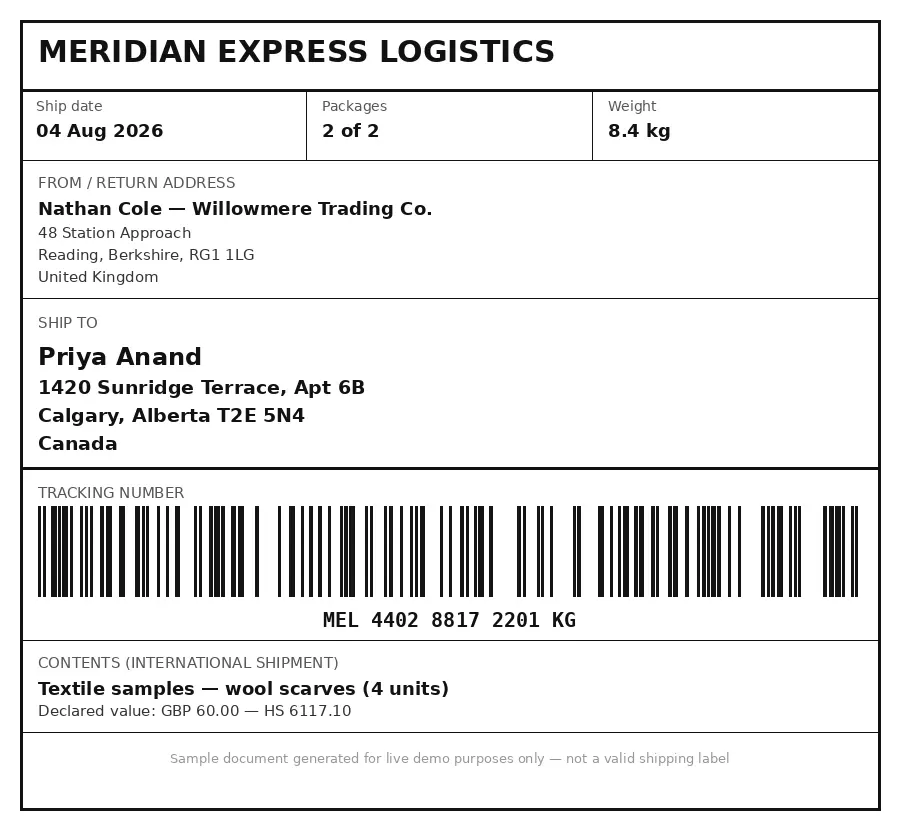
Select a document and press Parse
Want to run it on your own documents?
Ready to dive in? Request a key to get started.Business advantages
- Works on common label formats, no carrier-specific training required
- Sub-second processing per page scales to high-volume operations
- Structured JSON output feeds directly into WMS, ERP, and automation tools
- Pay-as-you-go pricing with a free tier to start, no upfront commitment
Frequently asked questions
Which file formats does ByteIt support for shipping labels?
ByteIt accepts PDF, JPEG, PNG, and TIFF files. This covers scanned paper labels, phone camera photos, thermal printer stickers, and native digital labels from carrier systems.
Does it work with all carriers, FedEx, UPS, DHL, USPS, and regional couriers?
Yes. The vision parser reads labels contextually, so it handles different carrier layouts, barcode formats, and address block positions without any per-carrier configuration. This includes major global carriers as well as regional and local courier labels.
Can I integrate the shipping label extraction with my WMS or ERP?
Yes. The API returns clean structured JSON that you can send directly to any warehouse management system, ERP, or shipping platform. You can also route the data through workflow automation tools such as n8n, Zapier, or Make for more complex multi-step processes.
How accurate is the extraction on low-quality or damaged labels?
The engine uses context-aware vision models that interpret the whole label layout, so it can still read fields even when a label is crumpled, partially torn, or poorly printed. Accuracy depends on the legibility of the original, but the model is designed to handle real-world warehouse conditions better than traditional OCR.
Does it handle multi-page shipping documents or just single labels?
The engine processes multi-page documents and returns extracted data per page. If a shipment has multiple labels or accompanying documents (such as an airway bill and a customs declaration), each page is parsed independently.
What does it cost to process shipping labels at scale?
ByteIt uses simple, usage-based pricing with a free tier to get started and competitive per-page rates that typically cost just a few cents per page. Higher-volume plans add parallel processing, and Enterprise plans offer custom pricing for high-volume or dedicated deployments. See the pricing page on byteit.ai for current plans and rates.
Can I extract customs-specific fields for international shipments?
Yes. For international shipping labels, the engine extracts content descriptions, package weight, and declared value. These fields can be fed directly into customs declaration forms and export documentation workflows.
Related documents
Delivery Notes
Extract delivery dates, item quantities, recipient details, and proof of delivery signatures from any delivery note or POD. No templates, no manual entry.
Packing Slips
Extract order numbers, shipped items, quantities, and tracking details from packing slips automatically. Remove manual data entry from your receiving workflow with ByteIt.
Bill Of Lading
Extract structured data from bills of lading, shipper, consignee, container IDs, cargo details, and routing. Supports ocean, road, and multimodal BOL formats.
Dispatch Notes
Extract dispatch notes, packing slips, and delivery confirmations into structured JSON. Automate goods-receipt matching and carrier reconciliation with AI.