
Benefits
Eliminate manual data entry from dispatch notes and packing slips, cutting processing time per document from minutes to seconds.
Reduce goods-receipt disputes caused by misread quantities or missed line items, catch discrepancies before invoices are paid.
Close the loop between shipping and billing: structured dispatch data enables automatic matching against carrier invoices and customer purchase orders.
Free warehouse and back-office staff from paperwork so they can focus on exception handling and inventory accuracy instead of typing.
How it works
- Step 1
Upload
Send the document to the API as a file or a URL no special formatting required.
- Step 2
The engine reads the document
The engine analyzes the page layout and identifies the content that matters. The engine reads dispatch notes, packing slips, and delivery confirmations, identifying printed and handwritten fields such as dispatch dates, reference numbers, recipient addresses, carrier details, and line-item tables across common layouts and paper qualities.
- Step 3
Structured JSON is returned
Every extracted element comes back as structured JSON, positioned and typed, ready to feed into downstream systems.
- Step 4
Confidence-based review
Each field carries a confidence score, so low-confidence results can be routed for human review instead of trusted blindly.
Example fields
A sample of what extraction can return, and many more when they appear on the document.
Features
Extracts printed and handwritten fields such as reference numbers, dates, shipment addresses, item-level quantities, and many more.
Outputs structured JSON, CSV, or XLSX, ready for ingestion into any WMS, ERP, or reconciliation workflow.
Supports batch upload and real-time API calls for both single-document and high-volume processing.
Handles multi-page dispatch notes, thermal paper formats, and low-quality scans without layout-specific templates.
Automatically parses line-item tables including descriptions, package counts, unit prices, and total values.
Use cases
Goods-Receipt Matching Against Purchase Orders
When goods arrive at a warehouse, the dispatch note provides the record of what was shipped. By extracting quantities, package counts, and item descriptions in real time, the receiving team can compare the data against the original purchase order before accepting the shipment. Discrepancies, missing items, damaged packaging, quantity mismatches, are flagged immediately, preventing inventory errors and supplier disputes from escalating.
Carrier Invoice Reconciliation
Carriers bill based on the number of packages, weight, or delivery method recorded at dispatch. Extracting package counts, packaging types, and delivery methods from dispatch notes allows finance teams to cross-reference carrier invoices automatically. Matches pass through; exceptions (overcharges, incorrect package counts) are routed for review without requiring someone to dig through paper stacks.
Warehouse-to-ERP Inventory Sync
Every dispatch represents inventory leaving the warehouse. Extracted line-item data, descriptions, quantities, unit prices, can be pushed directly into an ERP system to update stock levels and initiate the billing workflow. This closes the gap between warehouse operations and the finance system, reducing the lag that typically delays revenue recognition or restocking alerts.
Automated Customer Dispatch Notifications
Dispatch notes contain the information customers need: what was shipped, when, via which carrier, and the reference number. Extracting these fields and feeding them into a notification system (via workflow automation tools such as n8n, Zapier, or Make) enables automated email or portal updates to customers the moment goods are dispatched, without a member of staff manually composing each message.
Returns and Reverse Logistics Processing
When goods are returned, the return dispatch note often mirrors the original shipment. Extracting the reference number, dispatch date, and line items from the return note allows the system to locate the original order, compare quantities returned versus shipped, and trigger the refund or replacement process automatically, reducing the manual triage that slows down reverse logistics.
LIVE DEMO
Test dispatch note extraction now
Upload a sample dispatch note or packing slip in PDF, JPG, or PNG format and see the extracted fields in seconds, no sign-up required.
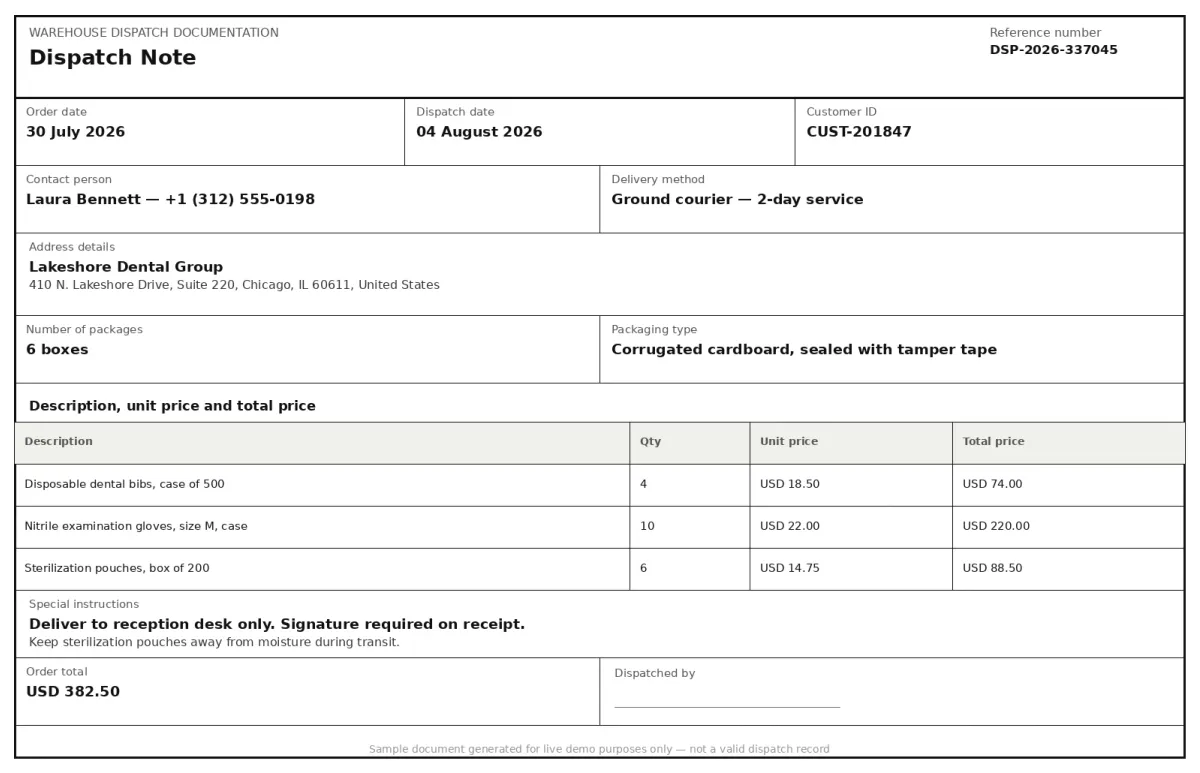
Select a document and press Parse
Want to run it on your own documents?
Ready to automate your dispatch processing? Request a key to get started.Business advantages
- Process dispatch notes in seconds instead of minutes, even handwritten fields.
- Reduce settlement delays caused by mismatched shipment records.
- Route extracted data straight into WMS, ERP, or accounting via API.
- Scale from a few documents a day to thousands without adding headcount.
Frequently asked questions
What file formats are supported for dispatch note uploads?
ByteIt accepts PDF, JPG, JPEG, PNG, and TIFF files. Thermal-printed slips and carbon-copied forms are supported as well, provided they are scanned or photographed in reasonable lighting.
Can the engine handle handwritten quantities and signatures on dispatch notes?
Yes. The extraction engine is trained to read handwritten fields, quantities, signatures, dates, and special instructions, alongside printed text. Accuracy depends on legibility, but the model is designed for the variable handwriting quality typical of warehouse and courier environments.
How do I integrate the dispatch note extraction API into my existing systems?
ByteIt provides a REST API that returns structured JSON, CSV, or XLSX. You can integrate it directly into your WMS or ERP codebase, or use workflow automation tools such as n8n, Zapier, or Make to pipe extracted data into your systems without writing custom integration code.
Is the API suitable for high-volume processing across multiple warehouses?
Yes. The API supports batch submission and concurrent processing. Whether you are handling a few hundred dispatch notes per day at a single site or thousands across multiple distribution centres, the engine scales to match your throughput.
Does the extraction preserve line-item tables from dispatch notes?
Yes. Dispatch notes typically list items with quantities, package types, and descriptions in table format. ByteIt extracts each line item as a structured object within the output, so you can reconcile line by line against purchase orders or customer shipments.
How does dispatch note extraction improve invoice matching?
By converting dispatch note data, reference numbers, quantities, package counts, into machine-readable format, your finance team can run automated three-way matching between the dispatch note, the carrier invoice, and the original purchase order. Exceptions are surfaced in minutes instead of waiting for a manual audit.
What is the pricing model for the dispatch note extraction API?
Pricing is based on document volume and plan tier. Visit the ByteIt pricing page for current credit rates and subscription options. There is no long-term commitment required for the pay-as-you-go plan.
Related documents
Delivery Notes
Extract delivery dates, item quantities, recipient details, and proof of delivery signatures from any delivery note or POD. No templates, no manual entry.
Bill Of Lading
Extract structured data from bills of lading, shipper, consignee, container IDs, cargo details, and routing. Supports ocean, road, and multimodal BOL formats.
Certificate Of Origin
Extract exporter, consignee, country of origin, transport route and goods data from certificates of origin. Automate customs clearance and trade compliance workflows.
Dangerous Goods Declarations
Extract structured data from Dangerous Goods Declarations (DGD). Capture UN numbers, hazard classes, shipping details, and emergency contact info from IATA and IMDG forms.
Custom Declarations
Extract structured data from customs declarations, SAD (C88), CN22, CN23, and other import/export forms. HS codes, declared values, parties, and line items from PDFs and scans.