
Benefits
Cuts tax-season data entry significantly by processing batches of mixed 1099 variants in one pass
Reduces rekeying errors on TINs and dollar amounts that trigger IRS mismatches or client amendments
Lets preparers review flagged exceptions only, rather than proofreading every field on every form
Frees senior staff from manual data entry during the busiest months of the tax calendar
How it works
- Step 1
Upload
Send the document to the API as a file or a URL no special formatting required.
- Step 2
The engine reads the document
The engine analyzes the page layout and identifies the content that matters. The extraction engine identifies the specific 1099 variant from the form header or layout then reads the relevant box amounts, payer and recipient identifiers, and withholding fields using contextual OCR that adapts to each variant's field positions.
- Step 3
Structured JSON is returned
Every extracted element comes back as structured JSON, positioned and typed, ready to feed into downstream systems.
- Step 4
Confidence-based review
Each field carries a confidence score, so low-confidence results can be routed for human review instead of trusted blindly.
Example fields
A sample of what extraction can return, and many more when they appear on the document.
Features
Classifies the 1099 variant (NEC, MISC, INT, DIV, K) automatically so you do not need separate templates for each layout
Extracts payer name, payer TIN, recipient name, recipient TIN, tax year, and all income-box amounts from scanned and born-digital documents
Captures federal income tax withheld and other withholding fields where present on the form
Exports structured results to Excel (.xlsx), CSV, and JSON for direct import into tax preparation software or accounting systems
Handles multi-page forms and attachments without losing field alignment across pages
Use cases
Tax-season client intake for CPA firms
CPA firms receive 1099s from clients in mixed formats, emailed PDFs from brokerages, scanned paper forms, even phone photos taken during meetings. The extraction engine classifies each 1099 variant and pulls payer details, TINs, and income amounts into a consolidated spreadsheet. Preparers review flagged exceptions and import the clean data into tax preparation software, cutting intake time from days to hours.
Automated reconciliation of contractor payments
Businesses that pay independent contractors issue 1099-NEC forms and need to reconcile the amounts against their payment records. Extracted data can be exported to Excel or connected via workflow automation tools to compare contractor totals, flag mismatches, and prepare annual filings, always reviewed by a human before submission.
Portfolio income aggregation for wealth management
Wealth managers and family offices receive dozens of 1099-INT and 1099-DIV forms per client across multiple accounts. Extracting interest and dividend amounts automatically into a consolidated income report lets advisors prepare tax summaries and review withholding positions without rekeying each brokerage statement.
Payment card and marketplace income tracking
E-commerce sellers and gig economy workers receive 1099-K forms from payment processors and marketplace platforms. Automated extraction pulls gross payment amounts, transaction counts, and state-specific fields into a single record, making it straightforward to report platform income alongside other 1099 data at tax time.
Downstream integration with accounting platforms
Extracted 1099 data can be routed into accounting or ERP systems through workflow automation tools such as n8n, Zapier, or Make. This means that received 1099s are automatically logged as income records, matched to vendor profiles, and made available for reconciliation, all without manual data entry.
LIVE DEMO
Try 1099 extraction yourself
Upload a sample 1099 PDF or image, or use one of our example documents below, and see the extracted fields appear instantly.
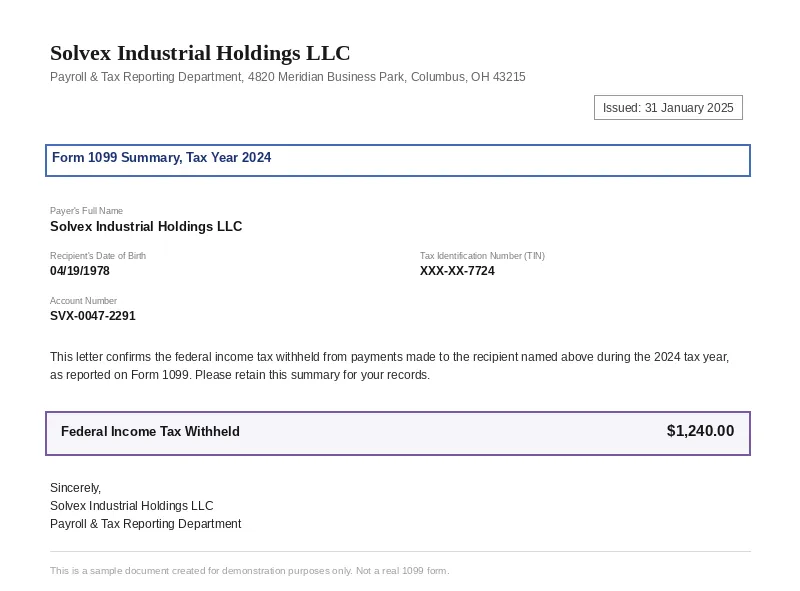
Select a document and press Parse
Want to run it on your own documents?
Ready to dive in? Request a key to get started.Business advantages
- ISO 27001 certified and GDPR-compliant, with AES-256 encryption for regulated tax workflows
- No templates or per-variant training, one endpoint handles the full 1099 series
- Documents deleted within 24 hours to meet data-retention compliance requirements
- Batch processing with a single upload queue, not one form at a time
Frequently asked questions
Which 1099 variants does the API support?
The engine handles 1099-NEC, 1099-MISC, 1099-INT, 1099-DIV, and 1099-K, plus common state-specific variants. It classifies each form automatically from the header or layout, so you do not need to set up separate extractors per variant.
What file formats are accepted?
You can upload PDF (including scanned and born-digital), JPEG, PNG, and TIFF files. The engine works with the same file you would receive from a client, whether it is a brokerage PDF export or a mobile phone photo of a paper form.
How does the API handle poor-quality scans or faxes?
The OCR engine is trained on noisy real-world inputs, including fax artefacts, low-resolution phone photos, and faded thermal paper. It returns confidence indicators so you can focus review effort on the fields most likely to need correction.
Can I export extracted 1099 data to Excel or my tax software?
Yes. The API returns structured JSON, CSV, or Excel formats. You can download results directly or route them into accounting and tax preparation platforms via standard workflow automation tools.
How do I integrate the extraction into my existing workflow?
ByteIt exposes a REST API that you can call from any programming language. For no-code setups, the extracted data can be passed to tools like n8n, Zapier, or Make to trigger downstream actions such as populating a spreadsheet row or creating a tax-software record.
Is the platform compliant with security standards for handling tax data?
Yes. ByteIt is ISO 27001 certified and GDPR-compliant and encrypts all data with AES-256 at rest and TLS 1.2+ in transit. Documents uploaded for extraction are deleted within 24 hours, with no copies retained.
What happens if a form has multiple pages or attachments?
The engine processes multi-page 1099 documents as a single unit, preserving field alignment across pages. Supporting statements or continuation pages attached to the form are handled within the same extraction request.
Related documents
Irs Tax Form
Extract structured data from IRS Form 1040 tax returns using AI. Capture taxpayer info, income, deductions, filing status, and refund amounts from PDFs and scans.
Tax Statement
Extract structured data from US Corporation Income Tax Returns and EU corporate tax statements. Capture EIN, taxable income, deductions, credits and more with ByteIt's AI engine.
Invoice
Extract invoice number, vendor data, line items, VAT, and totals from PDF invoices, scanned invoices, and receipt images with ByteIt's invoice data extraction API.
Receipt
Extract merchant name, line items, totals, VAT, and payment method from receipts with ByteIt's AI receipt parser. No templates, no training – just structured JSON from most common receipt formats.
Bank Statement
Extract account holder, IBAN, transaction dates, debit/credit amounts, and balances from PDF and scanned bank statements with ByteIt's OCR API.