
Benefits
Eliminates manual data entry from dense IRS forms, reducing transcription errors and freeing staff for higher-value tax advisory work
Speeds up tax return processing significantly, helping accounting firms handle more clients during the filing season without adding headcount
Provides structured, audit-ready data that can be exported to accounting software, ERP systems, or CCH/Avalara-type tax platforms
Supports multiple tax years (2023, 2024, 2025), so your workflow handles current and prior-year returns consistently
How it works
- Step 1
Upload
Send the document to the API as a file or a URL no special formatting required.
- Step 2
The engine reads the document
The engine analyzes the page layout and identifies the content that matters. For Form 1120, the engine reads the entire return page by page, extracting header information (name, address, EIN, tax year dates), income and deduction line items from Part I and Part II, tax computation figures from Part III, and checkbox flags that indicate special filing statuses or attached schedules.
- Step 3
Structured JSON is returned
Every extracted element comes back as structured JSON, positioned and typed, ready to feed into downstream systems.
- Step 4
Confidence-based review
Each field carries a confidence score, so low-confidence results can be routed for human review instead of trusted blindly.
Example fields
A sample of what extraction can return, and many more when they appear on the document.
Features
Extracts structured fields from Form 1120, such as company information, EIN, income line items, deductions, credits, tax liability calculations, and many more
Supports scanned PDFs, native digital PDFs, and high-resolution images of printed tax returns
Reads checkbox indicators for special filing statuses such as consolidated returns, personal holding companies, personal service corporations, and Schedule M-3 attachments
Returns data in JSON format accessible via REST API, ready for downstream validation or ingestion
Use cases
Automated tax return data entry for accounting firms
Accounting firms processing hundreds of corporate returns each filing season can feed scanned Form 1120 submissions through ByteIt and receive structured data without manual keystrokes. The extracted fields populate tax preparation software or review checklists, cutting per-return handling time and reducing keypunch errors.
Corporate tax provision and compliance consolidation
Multi-entity corporations that file consolidated returns can use extraction to centralise 1120 data from subsidiaries. Each entity's return is captured independently, and the structured output is consolidated into a single compliance workbook or ERP module for review before filing.
Tax credit and refund analysis pipeline
Finance teams monitoring refundable credits or estimated tax payments can run 1120 extractions across multiple years to identify patterns in credits claimed, payments made, and refunds received. The structured data feeds dashboards for cash flow forecasting or audit readiness reviews.
Downstream connectivity via workflow automation
Extracted Form 1120 data can be passed to accounting platforms, tax compliance software, or internal review systems using workflow automation tools such as n8n, Zapier, or Make. This eliminates the manual export step and ensures every return's data reaches the right system without re-keying.
LIVE DEMO
Try it yourself
Test extraction on a sample Form 1120 or upload your own PDF, JPG, or PNG file to see the engine read corporate tax return data in real time.
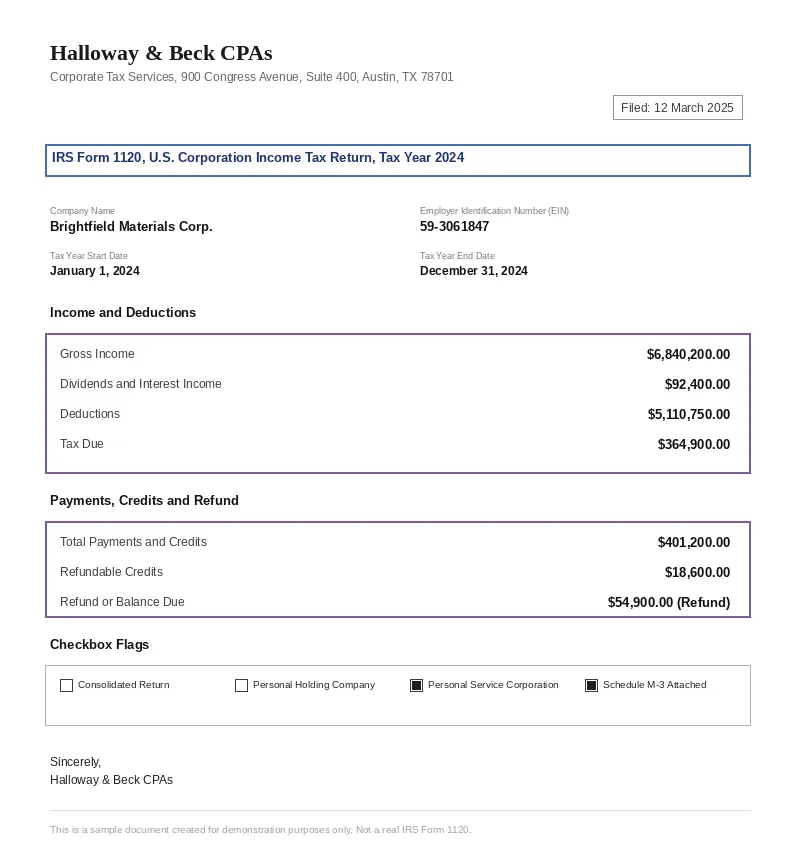
Select a document and press Parse
Want to run it on your own documents?
Ready to dive in? Request a key to get started.Business advantages
- Supports 2023, 2024, and 2025 IRS Form 1120 revisions out of the box
- REST API with standard JSON output for any downstream tax or accounting system
- No training data or template setup required, upload and extract in one step
- Designed for US corporate tax compliance with IRS-aligned field naming
Frequently asked questions
What is the pricing for the Form 1120 extraction API?
ByteIt operates on a credit-based pricing model. Each Form 1120 page processed consumes a set number of credits depending on your plan. Visit the ByteIt pricing page for current rates and volume discounts.
How do I integrate the 1120 extraction into my application?
ByteIt provides a RESTful API with a single Upload PDF endpoint. You send the document file and specify form_type=A_1120_2024 (or the relevant tax year). The API returns structured JSON. You can also connect it through workflow tools like n8n, Zapier, or Make for no-code integrations.
Which file formats are supported for Form 1120?
The API accepts PDF (both native digital and scanned), JPG, and PNG files. For best results with printed or handwritten returns, provide scans at 200 DPI or higher.
Can the engine handle low-quality scans or faint copies of IRS forms?
Yes, the extraction engine is trained to read IRS Form 1120 layouts even when scans are faded, skewed, or contain background noise. Higher resolution scans will yield more reliable results, but the system handles typical office-quality scans well.
Does it extract data from attached schedules like Schedule M-3?
Yes. The engine reads checkbox indicators that flag when Schedule M-3, Schedule PH, or consolidated return attachments are present. The main form's fields are fully extracted; additional schedules can be processed as separate documents if needed.
What tax years of Form 1120 are currently supported?
ByteIt currently supports Form 1120 for tax years 2023, 2024, and 2025. Use the corresponding form_type parameter (A_1120_2023, A_1120_2024, or A_1120_2025) when submitting your document.
How accurate is the extraction on Form 1120?
Accuracy depends on scan quality and form condition. The engine is purpose-built for IRS form extraction and performs well on clean digital PDFs and good-quality scans. We recommend validating extracted figures before filing, as you would with any automated data capture system.
Related documents
Irs Tax Form
Extract structured data from IRS Form 1040 tax returns using AI. Capture taxpayer info, income, deductions, filing status, and refund amounts from PDFs and scans.
Vat Statement
Extract tax authority, VAT number, taxable amounts and more from VAT statements with ByteIt's AI-powered API. Structured JSON output for tax filing and reconciliation.
Tax Statement
Extract structured data from US Corporation Income Tax Returns and EU corporate tax statements. Capture EIN, taxable income, deductions, credits and more with ByteIt's AI engine.
Balance Sheet
Extract assets, liabilities, equity, and period-tagged line items from balance sheets in PDF, Excel, or image format. API-first, hierarchical preservation.
Bank Statement
Extract account holder, IBAN, transaction dates, debit/credit amounts, and balances from PDF and scanned bank statements with ByteIt's OCR API.