
Benefits
Eliminate manual data entry from card statements, save hours per statement cycle and reduce transcription errors.
Speed up month-end reconciliation with structured transaction data that flows directly into your accounting or expense system.
Normalise data across different card issuers and statement formats, so downstream systems always receive consistent fields and formatting.
Get full visibility into corporate spending, fees, and interest without waiting for manual statement reviews.
How it works
- Step 1
Upload
Send the document to the API as a file or a URL no special formatting required.
- Step 2
The engine reads the document
The engine analyzes the page layout and identifies the content that matters. The engine reads the full credit card statement, cardholder details, balance summary, fee and interest line items, and the complete transaction table, adapting to the unique layout of each issuer's statement without requiring templates or pre-training.
- Step 3
Structured JSON is returned
Every extracted element comes back as structured JSON, positioned and typed, ready to feed into downstream systems.
- Step 4
Confidence-based review
Each field carries a confidence score, so low-confidence results can be routed for human review instead of trusted blindly.
Example fields
A sample of what extraction can return, and many more when they appear on the document.
Features
Extracts cardholder name, masked card number, statement period, and issuer details from most common statement layouts.
Captures complete transaction tables including date, merchant description, amount, transaction type, and category.
Pulls balance summary fields: previous balance, new charges, payments and credits, fees, interest, new balance, minimum payment, and credit limit.
Accepts PDF, JPG, and PNG inputs, works with digital PDFs, scanned paper statements, and photographed documents.
Returns structured JSON output ready for integration into accounting platforms, expense management tools, and custom workflows.
Use cases
Accounts Payable Reconciliation
Match corporate card transactions against expense reports, purchase orders, and receipts at scale. Extract every line item from a batch of hundreds of corporate card statements, compare against submitted expenses, and flag unmatched or unauthorised charges for review. The structured data can be connected to your ERP or accounting software using workflow automation tools like n8n, Zapier, or Make.
Lending and Credit Underwriting
Analyse an applicant's card spending patterns, payment history, and utilisation ratios directly from their statement data. Extract balances, credit limits, payment history, and fee patterns to feed into credit scoring models, reducing manual document review during loan origination, with a human review step for high-stakes credit decisions.
Employee Expense Auditing and Compliance
Monitor corporate card usage across the organisation by automatically parsing statements and categorising transactions by spend type, merchant category, and department. Set rules to flag out-of-policy spending, duplicate charges, or unusual patterns, and generate audit-ready reports without manual statement-by-statement review.
Personal Finance and Budgeting Automation
Aggregate transactions from multiple card statements into a single view for personal finance applications. Automatically categorise spending, groceries, dining, transport, subscriptions, and track budget adherence across all cards without manual data entry or spreadsheet exports.
LIVE DEMO
Try it yourself
Upload a sample credit card statement or use one of our pre-loaded examples to see extraction in action. Supports PDF, JPG, and PNG files.
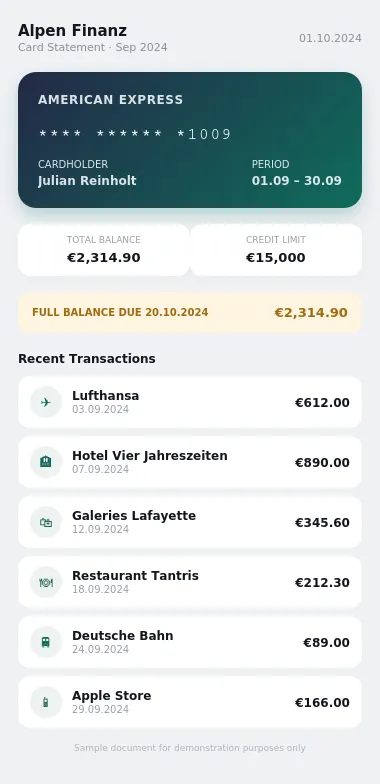
Select a document and press Parse
Want to run it on your own documents?
Ready to dive in? Request a key to get started.Business advantages
- Handles most common issuer layouts without template configuration
- Parses multi-page statements with dense transaction tables
- Returns data in seconds, not hours
- Free tier to start building, with a monthly allowance to test the API
Frequently asked questions
How is ByteIt's credit card statement extraction priced?
ByteIt uses simple, usage-based pricing with a free tier to get started, including full VLM extraction, table parsing, and JSON export. Higher-volume plans add parallel processing and team API keys, and Enterprise plans offer custom pricing with flexible credits, zero-data-retention options, and dedicated support. See the pricing page on byteit.ai for current plans and rates.
How do I integrate the extraction API into my system?
ByteIt provides a RESTful API with a Python SDK. You send a POST request to the /extract endpoint with your statement PDF or image, and receive structured JSON in response. The API can also be connected to workflow tools such as n8n, Zapier, or Make for no-code integrations with accounting platforms, ERPs, and expense management systems.
What statement formats and languages are supported?
The engine accepts PDF, JPG, and PNG files, including digital PDFs, scanned paper statements, and photographs. It reads statements from all major card networks (Visa, MasterCard, American Express, Discover) and proprietary store cards. Text extraction works across Latin-character languages; contact our sales team to discuss specific language requirements.
Can it extract individual transaction line items from complex tables?
Yes. The engine is designed to parse dense transaction tables across common layouts, columns for date, merchant description, amount, transaction type, and any category labels. It handles multi-page statements where the transaction table spans several pages, and preserves the relationship between each transaction row and its metadata.
How does the engine handle low-quality scans or photographed statements?
ByteIt's extraction engine uses vision-language models that read document images holistically rather than relying on traditional OCR alone. This approach allows it to extract data from imperfect source material, skewed scans, low-resolution photos, or statements with faint print, returning high-confidence fields even on lower-quality scans.
Is my financial data secure during processing?
Yes. ByteIt applies end-to-end encryption to all data in transit and at rest, and is GDPR compliant. For Enterprise customers, zero-data-retention policies and optional VPC or on-premise deployment are available. Statements are never shared with third parties and can be deleted after processing.
Can I process multiple card statements in a batch?
Yes. The Scale and Enterprise plans support parallel processing, allowing you to submit batches of statements simultaneously. This is useful for end-of-month reconciliation cycles where you need to process hundreds of corporate card statements in a single run.
Related documents
Invoice
Extract invoice number, vendor data, line items, VAT, and totals from PDF invoices, scanned invoices, and receipt images with ByteIt's invoice data extraction API.
Receipt
Extract merchant name, line items, totals, VAT, and payment method from receipts with ByteIt's AI receipt parser. No templates, no training – just structured JSON from most common receipt formats.
Bank Statement
Extract account holder, IBAN, transaction dates, debit/credit amounts, and balances from PDF and scanned bank statements with ByteIt's OCR API.
Purchase Order
Extract key fields from purchase orders automatically, PO number, line items, supplier details, totals and more. AI-powered OCR for any PO layout.