
Benefits
Cut manual data entry from minutes per waybill to seconds, freeing freight teams for higher-value work.
Reduce handwritten transcription errors that cause customs delays and invoice disputes across borders.
Process high volumes of CMR notes during peak shipping seasons without adding temporary data-entry staff.
Enable real-time track-and-trace by feeding structured carrier, goods, and delivery data into transport management systems.
How it works
- Step 1
Upload
Send the document to the API as a file or a URL no special formatting required.
- Step 2
The engine reads the document
The engine analyzes the page layout and identifies the content that matters. The engine reads the multilingual CMR form, including handwritten entries in boxes 1 through 24, carrier stamps, driver reservations, and groupage cargo lines, and returns structured fields such as sender, consignee, carrier, vehicle registration, loading and delivery addresses, goods description, gross weight, freight charges, and signatures.
- Step 3
Structured JSON is returned
Every extracted element comes back as structured JSON, positioned and typed, ready to feed into downstream systems.
- Step 4
Confidence-based review
Each field carries a confidence score, so low-confidence results can be routed for human review instead of trusted blindly.
Example fields
A sample of what extraction can return, and many more when they appear on the document.
Features
AI-powered OCR that reads handwritten fields from multilingual CMR forms (German, French, Spanish, English).
Structured extraction of sender, consignee, carrier, vehicle registration, places of loading and delivery, goods description, packages, gross weight, and freight charges.
Handles single-waybill and groupage (multi-line) consignments within one document.
No pre-trained templates required, the engine adapts to the common CMR layouts, including scans of the carrier's copy with stamps and reservations in the margins.
API-first design with JSON output for direct integration into TMS, ERP, or customs filing platforms.
Supports PDF, JPG, PNG, and TIFF uploads, including multi-page consignment note sets.
Use cases
Cross-border customs filing
Freight forwarders and customs brokers feed extracted sender, consignee, goods description, HS codes, and gross weight directly into customs declaration systems, reducing manual re-keying and the risk of misclassification that triggers inspections — always verified by a human before submission.
Freight audit and invoice matching
Match extracted freight charges and damages clauses from the CMR against carrier invoices. Flag discrepancies automatically before payment, and settle disputes with the signed delivery evidence already structured in your system.
Transport management system integration
Connect extracted CMR data to a TMS, ERP, or accounting software using workflow automation tools such as n8n, Zapier, or Make. Automate the creation of transport orders, update shipment status, and trigger invoicing without human touch.
Claims and insurance processing
When goods are damaged or lost in transit, the CMR note is the primary evidence. Instantly retrieve the carrier's registration, loading and delivery dates, goods description, and any driver reservations to accelerate insurance claims and support legal proceedings.
Groupage consignment splitting
For consolidated loads with multiple cargo lines under one CMR, the engine extracts each line's package count, gross mass, volume, and consignee. Warehouse operators can split and route partial deliveries without manually parsing the groupage section.
LIVE DEMO
Try it yourself
Upload a CMR waybill (PDF, JPG, or PNG) or test with our sample document to see how the extraction engine reads handwritten and printed fields in real time.
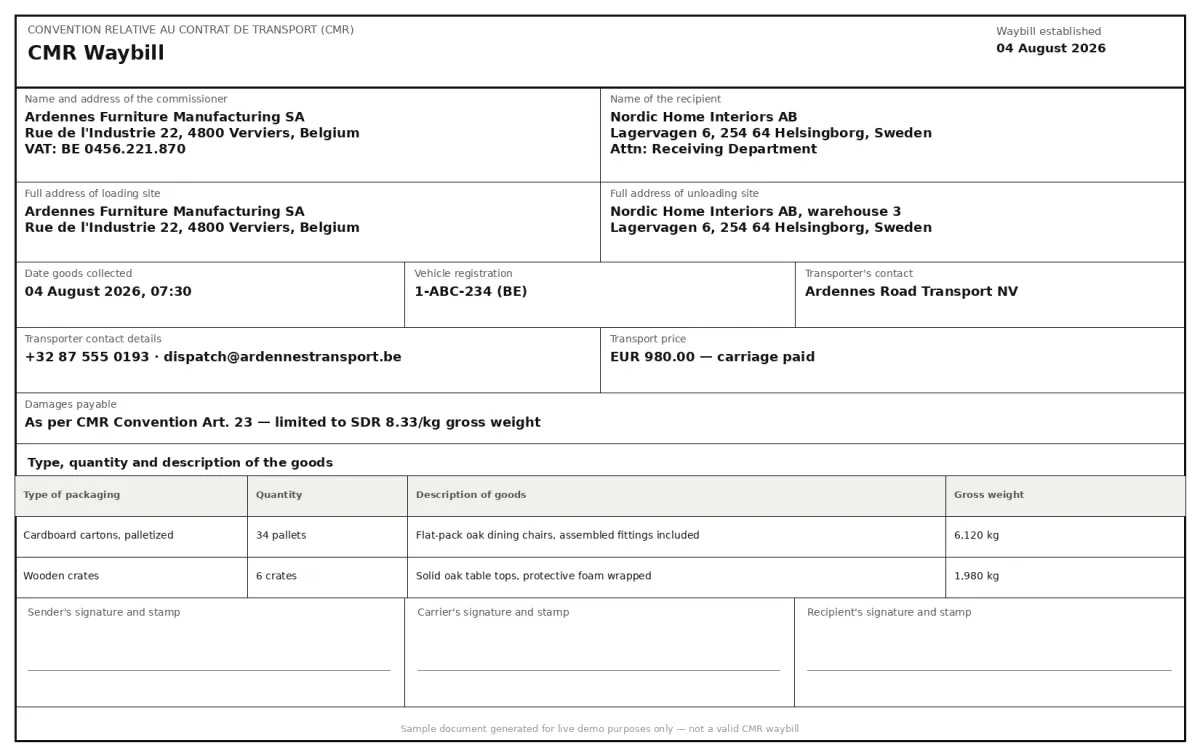
Select a document and press Parse
Want to run it on your own documents?
Ready to dive in? Request a key to get started.Business advantages
- One API for the common CMR layouts, no training needed.
- Handwritten field recognition with confidence scoring to flag uncertain fields.
- JSON output ready for TMS, ERP, and customs systems.
- Scalable from 10 to 10,000 waybills per day.
Frequently asked questions
Can the API read handwritten entries on a CMR waybill?
Yes. The CMR form is typically completed by hand in the cab. ByteIt's AI engine is trained to recognise handwritten text in the standard CMR field boxes, sender, consignee, carrier, goods description, weight, signatures, and driver reservations, including legible handwritten entries; accuracy depends on legibility.
What file formats are supported?
You can upload CMR waybills as PDF (including multi-page sets), JPG, PNG, and TIFF. The engine handles scans of the carrier copy, photocopies, and mobile phone photos of the green CMR form.
Does the engine support the multilingual CMR form?
Yes. The standard CMR consignment note uses German, French, Spanish, and English field labels on the same pre-printed form. The extraction engine reads the labels in any of these languages and returns the field data in a consistent JSON structure regardless of the source language.
How is the data delivered?
The API returns structured JSON with fields such as sender, consignee, carrier, vehicle registration, places and dates of loading and delivery, goods description, package count, gross weight, freight charges, and signatures. The output can be forwarded to any downstream system via webhook or workflow automation tools.
Can it handle groupage (multi-line) consignments?
Yes. When a single CMR note covers several cargo lines under one contract, the engine extracts each line's package count, gross mass, volume, and consignee details and returns them as a structured array in the JSON output.
What about pricing and integration?
ByteIt offers usage-based pricing with a free tier for testing. Integration is via a RESTful API with SDKs available for Python, Node.js, and other common languages. No upfront setup or template training is required.
Related documents
T1 T2 Documents
Extract structured data from EU T1 and T2 customs transit documents. Capture sender and recipient details, package counts, weights, seals, tariff numbers, and more.
Bill Of Lading
Extract structured data from bills of lading, shipper, consignee, container IDs, cargo details, and routing. Supports ocean, road, and multimodal BOL formats.
Custom Declarations
Extract structured data from customs declarations, SAD (C88), CN22, CN23, and other import/export forms. HS codes, declared values, parties, and line items from PDFs and scans.
Delivery Notes
Extract delivery dates, item quantities, recipient details, and proof of delivery signatures from any delivery note or POD. No templates, no manual entry.
Proof Of Delivery
Extract recipient name, signature, delivery date and location from signed PODs. Automate proof of delivery data capture from PDFs, scans and photos.