
Benefits
Reduce manual data entry errors on high-stakes hazmat declarations that can delay shipments or incur regulatory penalties.
Speed up freight booking cycles by feeding extracted DGD data directly into carrier compliance systems and ERP workflows.
Maintain audit-ready records by structuring every DGD field into a consistent, queryable format for customs and regulatory reviews.
Handle multi-page declarations and varied form layouts without template configuration or manual retraining.
How it works
- Step 1
Upload
Send the document to the API as a file or a URL no special formatting required.
- Step 2
The engine reads the document
The engine analyzes the page layout and identifies the content that matters. The engine reads the specific data fields on a Dangerous Goods Declaration: shipper and consignee addresses, transport document numbers, page numbering, shipper's and freight forwarder's references, carrier name, product descriptions with quantities and weights, vessel or flight numbers, and ports of loading, discharge, and final destination.
- Step 3
Structured JSON is returned
Every extracted element comes back as structured JSON, positioned and typed, ready to feed into downstream systems.
- Step 4
Confidence-based review
Each field carries a confidence score, so low-confidence results can be routed for human review instead of trusted blindly.
Example fields
A sample of what extraction can return, and many more when they appear on the document.
Features
Extracts shipper and consignee details, transport document numbers, vessel/flight information, ports of loading and discharge, and product descriptions with quantities and weights.
Processes DGDs in PDF, JPG, and PNG formats, including scanned and photographed documents.
Returns structured JSON output that integrates with workflow automation tools such as n8n, Zapier, or Make.
Supports English-language DGD forms across IATA, IMDG, and domestic regulatory layouts.
Use cases
Automated hazmat compliance verification
Logistics compliance teams can automatically extract UN numbers, hazard classes, and packing groups from incoming DGDs and validate them against current IATA or IMDG regulatory tables. Discrepancies are flagged in real time, reducing the risk of rejected shipments or fines during customs inspection — always verified by a human before any compliance decision.
Carrier booking and freight forwarding integration
Freight forwarders processing hundreds of DGDs daily can extract shipper and consignee addresses, vessel or flight numbers, and port details into structured data and push it directly into their booking platforms. This eliminates double-keying and cuts the turnaround time from document receipt to carrier booking confirmation.
ERP and supply chain data enrichment
Shipping and logistics departments can connect extracted DGD data into their ERP or warehouse management system using workflow automation tools like n8n, Zapier, or Make. Every hazmat shipment record is automatically enriched with the document number, product descriptions, weights, and quantities, giving supply chain teams a single source of truth without manual spreadsheet reconciliation.
Audit trail creation for regulatory inspections
Organisations subject to ADR, IMDG, or IATA audits can archive every processed DGD with its extracted fields in a searchable database. When an auditor requests documentation for a specific shipment, compliance officers can retrieve the structured record and the original document in seconds rather than digging through paper archives.
Multi-carrier document standardisation
Companies that ship hazardous goods via multiple carriers and transport modes (air, sea, road) receive DGDs in varying layouts and formats. ByteIt normalises these into a consistent field set, allowing logistics teams to compare, forward, and reconcile hazmat declarations without retraining or manual reformatting per carrier.
LIVE DEMO
Try it yourself
Upload a sample Dangerous Goods Declaration in PDF, JPG, or PNG format and see the extracted fields in real time.
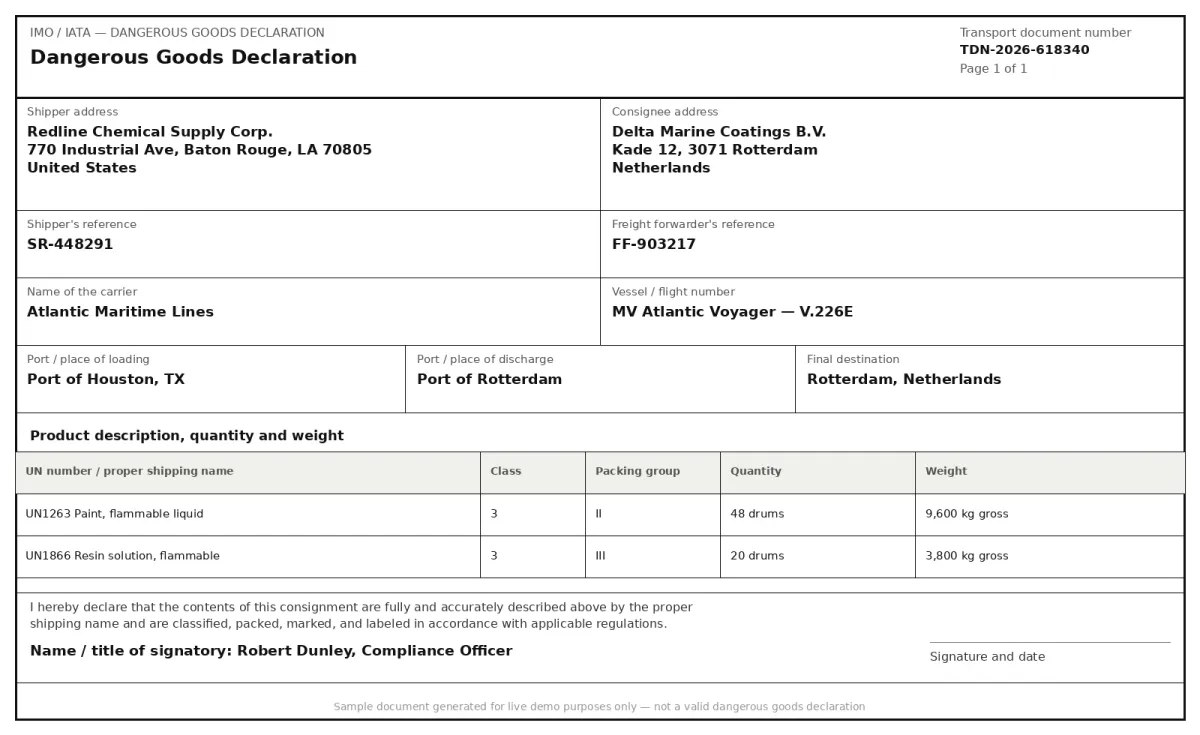
Select a document and press Parse
Want to run it on your own documents?
Ready to dive in? Request a key to get started.Business advantages
- Sub-second latency keeps hazmat shipping workflows moving at operational speed.
- No template configuration required, works with IATA, IMDG, and domestic DGD layouts out of the box.
- End-to-end encryption and GDPR compliance for sensitive shipping and emergency contact data.
- Pay-as-you-go pricing with a free tier to get started.
Frequently asked questions
What is a Dangerous Goods Declaration (DGD)?
A Dangerous Goods Declaration is a shipping document prepared by the shipper that confirms hazardous materials have been classified, packed, marked, and declared in accordance with applicable regulations such as IATA DGR, IMDG Code, or 49 CFR. It accompanies each consignment and provides carriers and regulators with the information needed to transport the goods safely.
What file formats are supported for DGD extraction?
ByteIt accepts PDF, JPG, and PNG files. Both digital and scanned DGDs are supported, including photographs of paper forms, as long as the document text is legible.
How is the DGD extraction API integrated?
ByteIt offers a REST API with a Python SDK for quick integration. You can also connect the API to your logistics workflow using no-code automation tools such as n8n, Zapier, or Make without writing custom code.
Can it extract data from low-quality scans or photographed DGDs?
Yes. ByteIt's extraction engine is designed to handle varying image quality, including scanned documents with uneven lighting, slight skew, or low resolution. For best results, ensure the document text is readable and the key fields are not obscured.
Does it support multi-page DGDs?
Yes. ByteIt processes multi-page Dangerous Goods Declarations, extracting fields across all pages and returning the consolidated data in a single structured JSON response. Page numbering is also captured where present.
How much does the API cost?
ByteIt uses simple, usage-based pricing with a free tier to get started and competitive per-page rates that typically cost just a few cents per page. Higher-volume and Enterprise plans add custom limits, zero data retention, and dedicated support. See the pricing page on byteit.ai for current plans and rates.
What languages does the DGD extraction support?
The Dangerous Goods Declaration extraction currently supports English-language documents. Support for additional languages is planned in future releases.
Related documents
T1 T2 Documents
Extract structured data from EU T1 and T2 customs transit documents. Capture sender and recipient details, package counts, weights, seals, tariff numbers, and more.
Bill Of Lading
Extract structured data from bills of lading, shipper, consignee, container IDs, cargo details, and routing. Supports ocean, road, and multimodal BOL formats.
Custom Declarations
Extract structured data from customs declarations, SAD (C88), CN22, CN23, and other import/export forms. HS codes, declared values, parties, and line items from PDFs and scans.
Certificate Of Origin
Extract exporter, consignee, country of origin, transport route and goods data from certificates of origin. Automate customs clearance and trade compliance workflows.
Export License
Extract data from export licenses automatically. Capture ECCN codes, licence numbers, consignee details, and more with ByteIt's AI document extraction.