
Benefits
Eliminate manual data entry from paper logbooks, saving hours of transcription per asset per week
Enable real-time visibility into equipment status across multiple sites without handling physical binders
Reduce audit preparation time from days to minutes with instantly searchable digital maintenance records
Prevent compliance risks caused by lost, damaged, or illegible paper logbook entries
How it works
- Step 1
Upload
Send the document to the API as a file or a URL no special formatting required.
- Step 2
The engine reads the document
The engine analyzes the page layout and identifies the content that matters. The extraction engine reads product logbook pages, both printed grid formats and freeform handwritten entries, and identifies structured fields such as serial numbers, dates, maintenance records, and equipment status by combining OCR with layout analysis tailored to logbook table structures.
- Step 3
Structured JSON is returned
Every extracted element comes back as structured JSON, positioned and typed, ready to feed into downstream systems.
- Step 4
Confidence-based review
Each field carries a confidence score, so low-confidence results can be routed for human review instead of trusted blindly.
Example fields
A sample of what extraction can return, and many more when they appear on the document.
Features
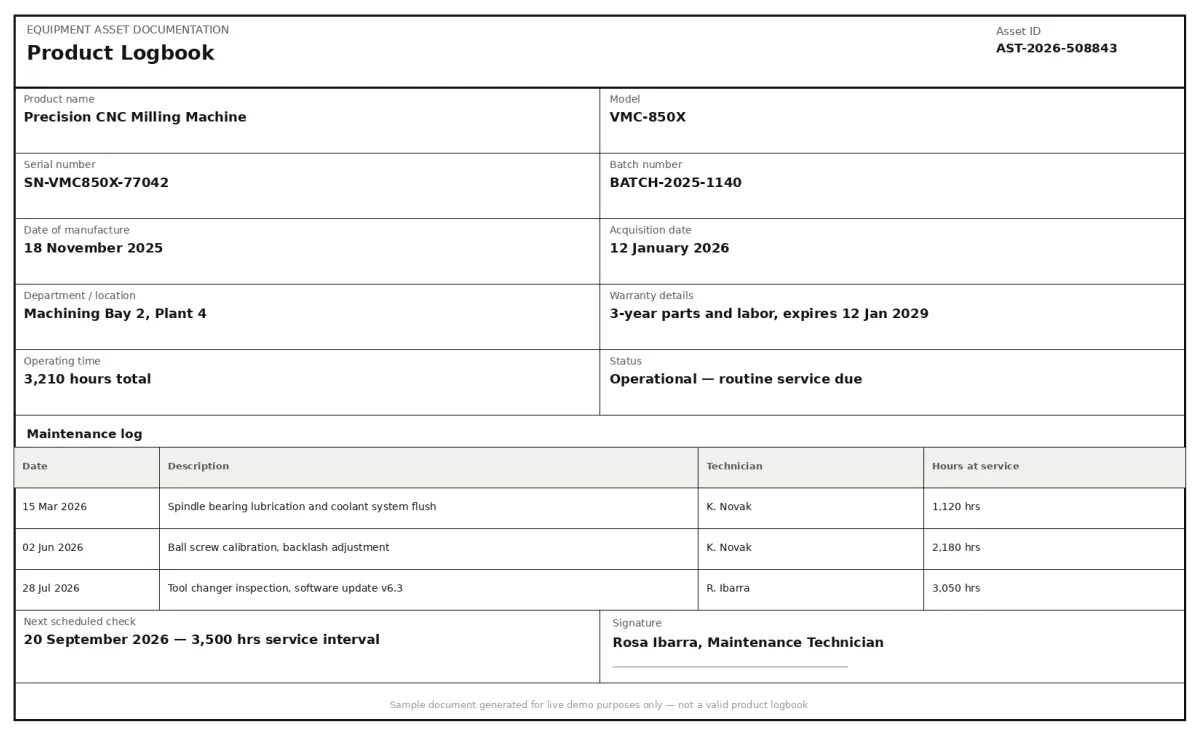
Extracts product name, serial number, model, batch number, date of manufacture, and acquisition date from logbook pages
Captures maintenance records, operating time, status fields, next scheduled check dates, and warranty details
Handles handwritten entries, typed text, stamps, and mixed-format logbook layouts from scans or mobile photos
Supports multipage logbook documents with batch processing for volumes of 100+ pages
Outputs structured JSON ready for integration into asset management systems, ERPs, and CMMS platforms
Use cases
Automated maintenance compliance reporting
Extract every scheduled check, repair note, and operator signature from equipment logbooks to populate digital maintenance logs. Maintenance teams can verify that each machine has up-to-date service records without flipping through binders, and compliance officers can generate audit-ready reports on demand.
Asset lifecycle tracking for logistics fleets
Connect extracted logbook data, serial numbers, acquisition dates, operating hours, and warranty expiry, into a central asset register. Logistics operators can track trailer and container lifecycles, schedule preventive maintenance based on accumulated operating time, and retire assets only when warranty and service history supports replacement.
Integration with CMMS and ERP systems
Forward extracted logbook fields directly into Computerised Maintenance Management Systems (CMMS) or enterprise resource planning tools using workflow automation platforms such as n8n, Zapier, or Make. This removes the manual step of re-typing maintenance logs and ensures the ERP always reflects the latest equipment condition.
Field service equipment handover digitisation
When equipment transfers between departments or sites, the accompanying paper logbook is often lost or delayed. Digitising logbook records at the point of handover ensures the receiving team has immediate access to complete operating history, next scheduled checks, and warranty status, all without chasing paper files.
Supplier quality and batch traceability
Extract batch numbers and date-of-manufacture fields from incoming equipment logbooks to verify that received assets match purchase order specifications. Quality teams can cross-reference logbook entries against supplier certificates and flag discrepancies before equipment enters production use.
LIVE DEMO
Try product logbook extraction yourself
Upload a sample product logbook page or scan to see how ByteIt extracts serial numbers, dates, maintenance records, and other key fields into structured JSON. Accepts PDF, JPG, and PNG files.
Select a document and press Parse
Want to run it on your own documents?
Ready to digitise your logbooks? Get your API key in Studio.Business advantages
- Reduces manual data entry labour for maintenance and asset teams
- Cuts audit preparation time by delivering searchable digital records instantly
- Improves equipment uptime with accurate, accessible maintenance histories
- Minimises compliance risk from lost or illegible paper logbook entries
Frequently asked questions
What file formats does ByteIt support for product logbook uploads?
ByteIt accepts PDF, JPG, JPEG, and PNG files. Multipage PDF logbooks are supported, and the engine processes each page individually to capture all entries across the document.
Can the engine read handwritten entries in product logbooks?
Yes. The OCR engine is trained to handle both typed and handwritten text commonly found in logbook entries, including dates, signatures, maintenance notes, and numeric readings. Accuracy depends on legibility, but the engine performs well on most standard logbook handwriting.
What fields can be extracted from a product logbook?
Examples of fields that can be returned include product name, serial number, model, batch number, date of manufacture, acquisition date, department location, warranty details, operating time, maintenance records, equipment status, next scheduled check, signature, and many more. Additional custom fields can be configured as needed.
How does ByteIt handle low-quality scans or faded logbook pages?
ByteIt includes pre-processing steps such as contrast enhancement, deskewing, and edge detection to improve OCR results on poor-quality scans. Very low legibility may reduce extraction confidence, and the confidence score allows downstream systems to flag uncertain fields for manual review.
Can logbook data be integrated into my existing asset management or CMMS software?
Yes. ByteIt returns structured JSON output that can be forwarded to any downstream system. You can connect the extraction pipeline to your ERP, CMMS, or asset register using workflow automation tools such as n8n, Zapier, or Make.
How are multipage logbooks processed?
Multipage PDF or image sequences are processed page by page. Each page's extracted fields are returned as separate entries in the JSON output, preserving the chronological order of the original logbook.
Does ByteIt support batch processing for large logbook volumes?
Yes. The API is designed for high-throughput processing and can handle batches of 100 pages or more in a single submission. This makes it suitable for digitising entire warehouse shelves of legacy logbooks in one operation.
Related documents
Delivery Notes
Extract delivery dates, item quantities, recipient details, and proof of delivery signatures from any delivery note or POD. No templates, no manual entry.
Dispatch Notes
Extract dispatch notes, packing slips, and delivery confirmations into structured JSON. Automate goods-receipt matching and carrier reconciliation with AI.
Certificate Of Analysis
Extract structured data from Certificates of Analysis (COA) with ByteIt's AI engine. Capture batch numbers, test results, specifications and compliance details from PDFs and images.
Proof Of Delivery
Extract recipient name, signature, delivery date and location from signed PODs. Automate proof of delivery data capture from PDFs, scans and photos.
Shipping Labels
Extract tracking numbers, addresses, sender and receiver names, and package details from common shipping labels, FedEx, UPS, DHL, USPS, and regional carriers. No templates needed.