
Benefits
Replace manual keying of card numbers, names and dates with automatic capture from a photo or scan, cutting data entry time to a matter of seconds.
Reduce chargeback and decline risks by removing the human-error step from card data collection in checkout flows and account set-up.
Speed up onboarding for payment services, wallets, and corporate card programmes by pulling card details directly from an image rather than a web form.
Handle mixed card types, Visa, Mastercard, Amex, Discover and others, without training separate models for each issuer.
How it works
- Step 1
Upload
Send the document to the API as a file or a URL no special formatting required.
- Step 2
The engine reads the document
The engine analyzes the page layout and identifies the content that matters. The engine reads the embossed or printed text on the card surface, identifies the card number, cardholder name, expiration date, CVC and issuer, and returns them as structured fields regardless of card orientation, background pattern, or issuer logo placement.
- Step 3
Structured JSON is returned
Every extracted element comes back as structured JSON, positioned and typed, ready to feed into downstream systems.
- Step 4
Confidence-based review
Each field carries a confidence score, so low-confidence results can be routed for human review instead of trusted blindly.
Example fields
A sample of what extraction can return, and many more when they appear on the document.
Features
Extracts card number, cardholder name, expiration date, CVC and issuer/vendor from a single image or PDF.
Accepts phone-captured photos, scanned documents, and digital PDFs as input without pre-processing.
Supports embossed (raised character) and printed (flat) card formats across multiple issuers.
Returns a structured JSON response with each recognised field ready to pass into a payment or CRM system.
REST API and SDK integration with no-code workflow tools for connecting extracted data to downstream applications.
Use cases
Mobile payment and wallet onboarding
A fintech app lets users add a card by taking a photo with their phone camera. The extraction engine reads the card number, expiration date and CVC from the image and populates the payment profile fields automatically, removing the friction of manual typing and the risk of keying errors.
Corporate card expense reconciliation
Finance teams photograph physical corporate cards during employee onboarding to register them in the expense management system. The extracted cardholder name and card number are matched to the employee record, and the expiration date triggers automated re-enrolment reminders before cards expire.
Account verification for payment services
A payment gateway requires card verification during merchant onboarding. Card images submitted by merchants are processed to extract the issuing bank and card number prefix for BIN/IIN lookup, validating the card type and country of issue before the account is activated.
KYC and identity verification workflows
Identity verification platforms accept a photo of the front of a debit or credit card as part of a multi-document KYC check. The extracted cardholder name and card number are cross-referenced against the user's government-issued ID to strengthen the proof of identity, always verified by a human before identity decisions are finalised.
ERP and accounting system integration
Extracted card data can be passed into an ERP or accounting system using workflow automation tools like n8n, Zapier, or Make, enabling automated vendor record creation, payment method registration, or expense categorisation without manual intervention.
LIVE DEMO
Try it yourself
Choose a sample card below or upload your own photo or PDF to see how the extraction engine reads card number, cardholder name, expiry date, CVC and issuer in real time.
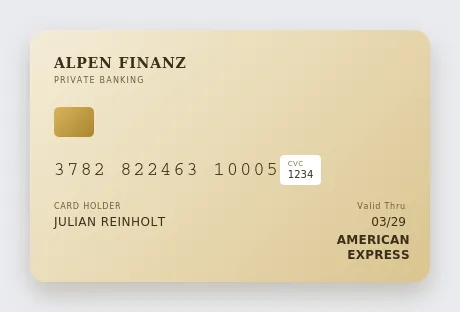
Select a document and press Parse
Want to run it on your own documents?
Ready to dive in? Request a key to get started.Business advantages
- One API for all major card issuers and formats.
- Works from phone photos no dedicated scanner hardware needed.
- No manual model training or label preparation required.
- RESTful architecture integrates with any stack.
Frequently asked questions
How is the API priced?
ByteIt offers a pay-as-you-go pricing model based on the number of pages processed. A free tier with a monthly credit allowance is available for testing. See the pricing page on byteit.ai for current rates and plan limits.
How do I integrate the card extraction API into my application?
The API is accessed via a REST endpoint. You send the card image as a file or URL and receive a structured JSON response. SDKs are available for popular languages, and you can also connect the API through no-code workflow tools such as n8n, Zapier, or Make.
What languages and card formats are supported?
The model currently reads English-language card text. It supports embossed (raised) and printed (flat) card formats from all major issuers including Visa, Mastercard, American Express and Discover.
What file formats can I submit?
The API accepts PDF, JPEG, PNG, BMP, TIFF and HEIF files. Both phone-captured photos and scanned documents are supported with no pre-processing required.
How well does it handle low-quality images or worn cards?
The engine is trained on a range of image qualities including low-light photos and slightly blurry captures. For best results, submit a well-lit, in-focus image with the card laid flat and the full front surface visible.
Is the extracted data stored or logged?
ByteIt processes documents in memory and does not retain extracted card data after the response is returned unless you explicitly enable logging for debugging. The platform is GDPR-compliant and data is handled in accordance with standard privacy practices.
Does it work with both credit and debit cards?
Yes. The extraction engine processes both credit and debit cards from most major issuers. The same API call handles card number, cardholder name, expiration date, CVC and issuer fields across credit, debit, prepaid and corporate card formats.
Related documents
Invoice
Extract invoice number, vendor data, line items, VAT, and totals from PDF invoices, scanned invoices, and receipt images with ByteIt's invoice data extraction API.
Receipt
Extract merchant name, line items, totals, VAT, and payment method from receipts with ByteIt's AI receipt parser. No templates, no training – just structured JSON from most common receipt formats.
Bank Statement
Extract account holder, IBAN, transaction dates, debit/credit amounts, and balances from PDF and scanned bank statements with ByteIt's OCR API.
Purchase Order
Extract key fields from purchase orders automatically, PO number, line items, supplier details, totals and more. AI-powered OCR for any PO layout.
Credit Card Statement
Extract transactions, balances, and payment details from credit card statements with AI. Parse Visa, MasterCard, Amex and more into structured JSON.