
Benefits
Faster cash application by mapping remittance data directly to open invoices without manual rekeying
Reduced days sales outstanding (DSO) through same-day payment posting instead of batch processing delays
Fewer reconciliation errors caused by mistyped invoice numbers or transposed payment amounts
Handles most customer formats automatically, so you stop building and maintaining individual templates
How it works
- Step 1
Upload
Send the document to the API as a file or a URL no special formatting required.
- Step 2
The engine reads the document
The engine analyzes the page layout and identifies the content that matters. ByteIt's extraction engine reads remittance advice documents of common layouts and formats, identifying payer and payee details, payment dates, amounts, invoice numbers being paid, payment methods, and remittance references, across different column orders, page counts, and field naming conventions.
- Step 3
Structured JSON is returned
Every extracted element comes back as structured JSON, positioned and typed, ready to feed into downstream systems.
- Step 4
Confidence-based review
Each field carries a confidence score, so low-confidence results can be routed for human review instead of trusted blindly.
Example fields
A sample of what extraction can return, and many more when they appear on the document.
Features
Extracts payer and payee information, payment amounts, dates, invoice references, and remittance numbers from most common remittance advice layouts
Reads scanned PDFs, native digital PDFs, images (JPG, PNG), and text-based formats without pre-processing or template setup
Maps each customer's field names (e.g. "Reference Number" vs "Invoice #") to your standard output schema without manual mapping rules
Supports multi-page remittance advices, including documents where payment detail spans several pages with varying column structures
Outputs structured JSON data ready for direct import into ERP cash application modules or workflow automation tools
Use cases
Automated accounts receivable cash application
Accounts receivable teams receive remittance advices from hundreds of customers, each in a different format. ByteIt extracts payment details and invoice references automatically, then feeds the structured data into your ERP's cash application module to match payments against open invoices and post them the same day, reducing DSO by eliminating the manual keying queue.
Deduction and short-pay management
Customers frequently deduct discounts, dispute small amounts, or short-pay invoices. ByteIt extracts the exact payment amount alongside the original invoice total from the remittance advice, so your AR system can flag discrepancies automatically and route short-pays or over-pays to the collections or dispute resolution team for follow-up rather than discovering them weeks later during month-end reconciliation.
Multi-channel remittance processing hub
Remittance advices arrive through email attachments, customer AP portals, EDI feeds, and lockbox files. ByteIt acts as a single extraction layer that normalises data from all these sources into a consistent schema, so your ERP receives one clean feed regardless of whether the payment detail came as a PDF scan from a small customer or a structured file from an enterprise.
ERP and workflow automation integration
Extracted remittance data can be passed into your accounting ERP or workflow automation tools like n8n, Zapier, or Make for automated processing. For example, when a remittance advice is received, ByteIt extracts the invoice numbers and amounts, triggers a payment posting in your ERP, and sends a confirmation email to the customer, with a human review step before payments are finalised.
Month-end reconciliation acceleration
Finance teams spend the first week of every month matching bank deposits to open invoices. By extracting and structuring remittance data on receipt, ByteIt ensures that by month-end every payment has already been matched and posted, turning a week-long reconciliation effort into a same-day validation check.
LIVE DEMO
Try it yourself
Test the extraction with a sample remittance advice document or upload your own file in PDF, JPG, or PNG format to see how ByteIt reads payment details and invoice references.
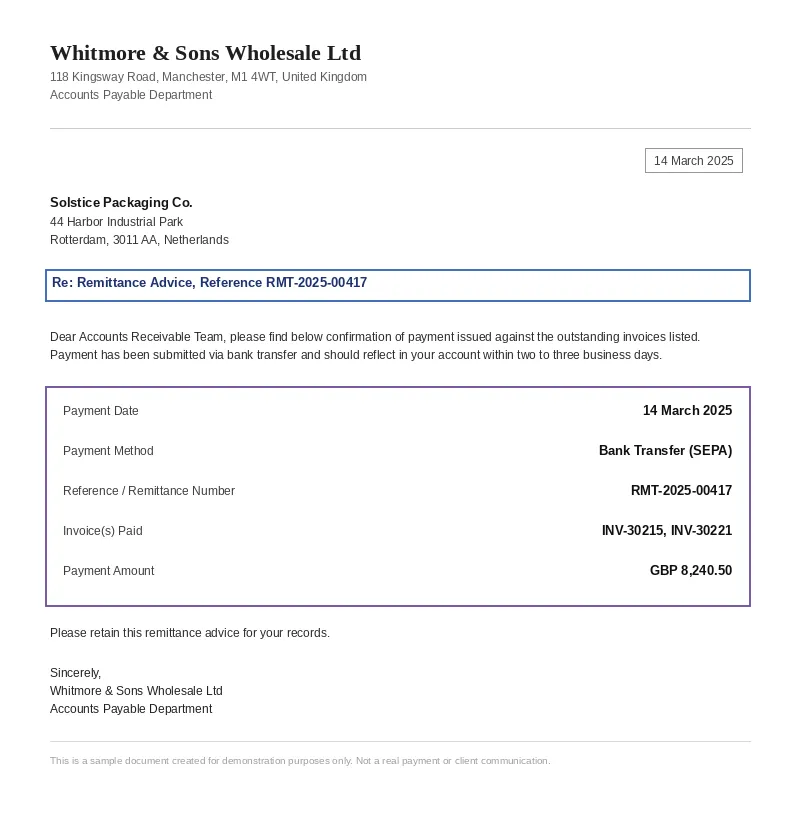
Select a document and press Parse
Want to run it on your own documents?
Ready to automate your remittance processing? Request a key to get started.Business advantages
- One model, all formats: no per-customer template configuration required
- Straight-through processing ready: structured output designed for ERP import without transformation
- Scalable by design: processes one remittance or ten thousand without linear cost increase
- No training data needed: the engine works out of the box on most remittance advice layouts
Frequently asked questions
What is a remittance advice and why does it matter for accounts receivable?
A remittance advice is a document sent by a customer to a vendor listing which invoices are being paid, the amounts paid, and any deductions taken. It is essential for cash application because without it, finance teams cannot tell which open invoices a payment is meant to close. Automating the extraction of remittance data directly speeds up payment posting and reduces DSO.
What file formats does the engine support for remittance advices?
ByteIt accepts PDF (both native digital and scanned), JPG, and PNG formats. Multi-page PDFs are fully supported, including remittance advices where payment details span several pages with different column layouts.
How does the engine handle different customer layouts and column names?
The extraction engine reads the document layout and field context rather than relying on fixed positions or template matching. So whether a customer labels it "Reference Number", "Invoice #", "Doc No", or "PO Reference", the engine extracts the correct data and maps it to your standard output schema without requiring per-customer configuration.
What is a typical cash application workflow using extracted remittance data?
Once ByteIt extracts the invoice numbers, payment amounts, and customer information from a remittance advice, that structured data can be sent directly to your ERP's cash application module. The ERP matches each payment line to open invoices, posts the receipts, and flags any short-pays or over-pays for review. The entire process from receipt to posting can run within minutes rather than days.
Does the engine handle deductions, discounts, and partial payments?
Yes. The extraction reads the full payment breakdown, including the total payment amount, individual invoice amounts, and any deduction or discount line items if present in the document. This enables your system to detect short-pays and route them to the appropriate team without manual scanning.
How is the API priced?
ByteIt operates on a credit-based pricing model. Each page of a remittance advice document processed consumes a set number of credits. Visit the pricing page on byteit.ai for current plans and credit rates.
How accurate is extraction on low-quality scans of remittance advices?
The engine includes image pre-processing that handles variable scan quality, skewed pages, and low-resolution images. Accuracy depends on the legibility of the source document, but the model has been trained on a broad range of real-world document quality levels and performs reliably across them.
Related documents
Invoice
Extract invoice number, vendor data, line items, VAT, and totals from PDF invoices, scanned invoices, and receipt images with ByteIt's invoice data extraction API.
Receipt
Extract merchant name, line items, totals, VAT, and payment method from receipts with ByteIt's AI receipt parser. No templates, no training – just structured JSON from most common receipt formats.
Bank Statement
Extract account holder, IBAN, transaction dates, debit/credit amounts, and balances from PDF and scanned bank statements with ByteIt's OCR API.
Purchase Order
Extract key fields from purchase orders automatically, PO number, line items, supplier details, totals and more. AI-powered OCR for any PO layout.
Credit Card Statement
Extract transactions, balances, and payment details from credit card statements with AI. Parse Visa, MasterCard, Amex and more into structured JSON.