
Benefits
Turn a five-minute manual review into a ten-second automated extraction, freeing compliance staff for actual risk decisions.
Eliminate the gap between what a COI says on paper and what your tracking spreadsheet shows, no more transcription errors on policy limits or effective dates.
Stay ahead of expiring coverage with structured data that can feed alerts and dashboards before the certificate lapses.
Handle contractor, vendor, and tenant COIs at scale without hiring more headcount to keep the tracker current.
How it works
- Step 1
Upload
Send the document to the API as a file or a URL no special formatting required.
- Step 2
The engine reads the document
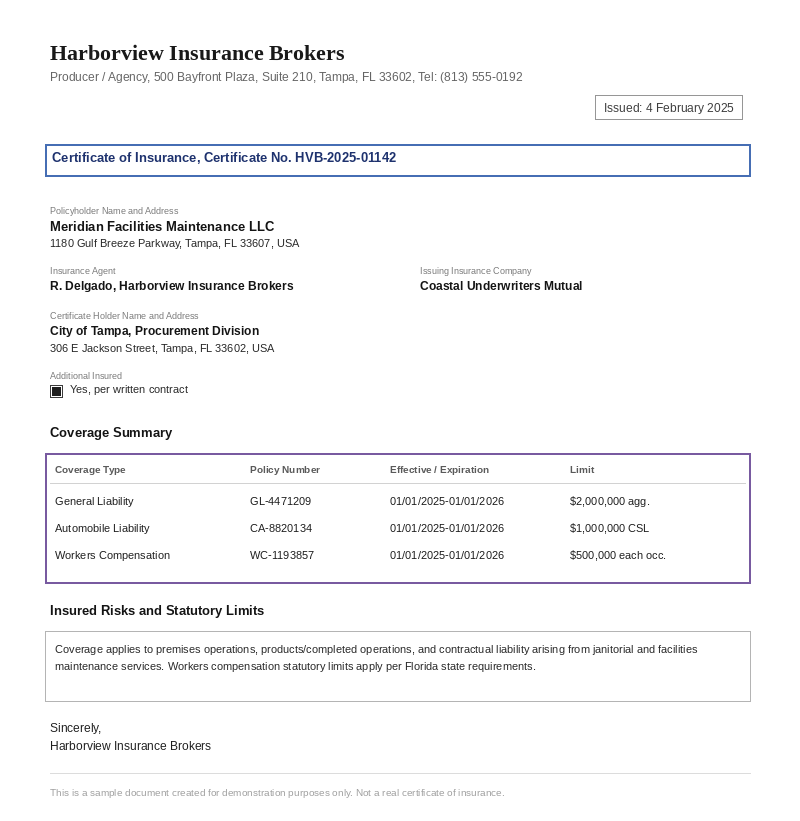
The engine analyzes the page layout and identifies the content that matters. The engine reads the full certificate layout, header blocks for producer and insured, coverage tables with multiple policy rows, special endorsements and additional insured indicators, and parses them into a structured JSON output without templates.
- Step 3
Structured JSON is returned
Every extracted element comes back as structured JSON, positioned and typed, ready to feed into downstream systems.
- Step 4
Confidence-based review
Each field carries a confidence score, so low-confidence results can be routed for human review instead of trusted blindly.
Extractable fields
Features
Reads ACORD 25, ACORD 27, and non-standard agency letterhead layouts without template configuration.
Extracts coverage tables including policy type, policy number, effective date, expiration date, and per-occurrence / aggregate limits.
Outputs producer details, insured party information, certificate holder, and additional insured flags as structured JSON.
Returns data via REST API that can feed Google Sheets, Airtable, webhooks, or any downstream compliance system through tools like n8n, Zapier, or Make.
Use cases
Vendor Insurance Compliance Tracking
Procurement teams receive hundreds of COIs from subcontractors and suppliers each quarter. Instead of manually keying policy numbers and coverage limits into a spreadsheet, ByteIt extracts the data automatically and pushes it into a compliance tracker. A workflow automation tool can then flag policies that fall below minimum required limits or expire within 30 days.
Contractor Onboarding for Property Managers
Property management firms need proof of insurance from every contractor before they step onto a site. ByteIt extracts insured party details, certificate holder information, and policy periods from submitted COIs and routes the structured data into tenant and vendor management systems, reducing onboarding time from days to minutes.
Real Estate Transaction Due Diligence
During acquisitions and lease signings, legal and risk teams must verify that all relevant parties carry adequate coverage. The extraction API reads COIs for certificate holder and additional insured designations, then feeds the structured output into deal-management dashboards so reviewers can compare coverage against contractual requirements without opening each PDF.
Insurance Brokerage Portfolio Audits
Brokers who manage commercial accounts often need to audit their book of business for coverage gaps. ByteIt extracts coverage types, limits, and effective dates across all client COIs and returns the data in a structured format that can be loaded into business intelligence tools for portfolio-wide risk analysis.
Automated Expiration Alerts with Downstream Workflows
Connect ByteIt's COI extraction output to your compliance platform or ERP using workflow automation tools like n8n, Zapier, or Make. When a new COI is processed, the policy period fields can trigger calendar reminders, email alerts to the insured, or automated requests for a renewal certificate, keeping the compliance cycle running without manual follow-up.
LIVE DEMO
Try it yourself
Upload a sample Certificate of Insurance in PDF, JPG, or PNG format and see the extracted policy fields in seconds, no sign-up required.
Select a document and press Parse
Want to run it on your own documents?
Ready to dive in? Request a key to get started.Business advantages
- No template training, works across agency layouts and form versions out of the box.
- Structured JSON output ready for compliance dashboards and alerts.
- Handles scanned and digitally generated COIs equally well.
- REST API with a single endpoint, integrate in hours, not weeks.
Frequently asked questions
What file formats does ByteIt support for Certificate of Insurance extraction?
ByteIt accepts PDF, JPG, and PNG files. Both digitally generated COIs and scanned paper certificates are supported.
Does the engine handle non-standard COI layouts, not just ACORD forms?
Yes. ByteIt is trained on a wide variety of certificate layouts, including ACORD 25 and 27 forms as well as COIs issued on independent agency letterhead. No template configuration is needed when the layout changes.
How do I integrate COI extraction into my compliance workflow?
ByteIt provides a REST API that returns extracted fields as JSON. You can connect the output to Google Sheets, Airtable, webhooks, or any downstream system using no-code tools like n8n, Zapier, or Make, or write a direct integration against the API.
How accurate is the extraction for coverage limits and policy numbers?
Accuracy depends on the quality of the source document. For clear, well-scanned or digitally generated COIs, extraction of standard fields such as policy numbers, coverage limits, and effective dates is highly reliable. ByteIt handles low-resolution scans and varied layouts better than template-based OCR, but heavily damaged or illegible documents may reduce accuracy.
Can ByteIt extract coverage tables with multiple policy types on a single COI?
Yes. The engine reads coverage tables row by row, general liability, automobile liability, workers compensation, and any additional lines, and returns each policy's type, number, effective date, expiration date, and associated limits as separate structured entries.
Does the API support multi-page Certificates of Insurance?
Yes. ByteIt processes multi-page PDFs and consolidates the extracted data from all pages into a single structured output.
How is ByteIt priced for COI extraction?
ByteIt operates on a usage-based pricing model with a free tier and paid plans based on page volume. Visit the pricing page for current rates and credit limits.
Related documents
Invoice
Extract invoice number, vendor data, line items, VAT, and totals from PDF invoices, scanned invoices, and receipt images with ByteIt's invoice data extraction API.
Purchase Order
Extract key fields from purchase orders automatically, PO number, line items, supplier details, totals and more. AI-powered OCR for any PO layout.
Remittance Advice
Extract payment details, invoice references, and customer data from remittance advices automatically. Speed up accounts receivable reconciliation with AI.
Loan Application
Extract borrower data from Uniform Residential Loan Application (Form 1003/URLA) documents. Automate mortgage origination with AI-powered data extraction.