
Benefits
Reduce intake-to-adjudication cycle time by automating data entry at the point of first notice
Free adjusters from manual keying so they spend time evaluating damage and coverage instead
Handle fluctuating claim volumes during自然灾害 or peak seasons without scaling headcount
Maintain audit-ready records with consistent extraction across carriers, formats, and loss types
How it works
- Step 1
Upload
Send the document to the API as a file or a URL no special formatting required.
- Step 2
The engine reads the document
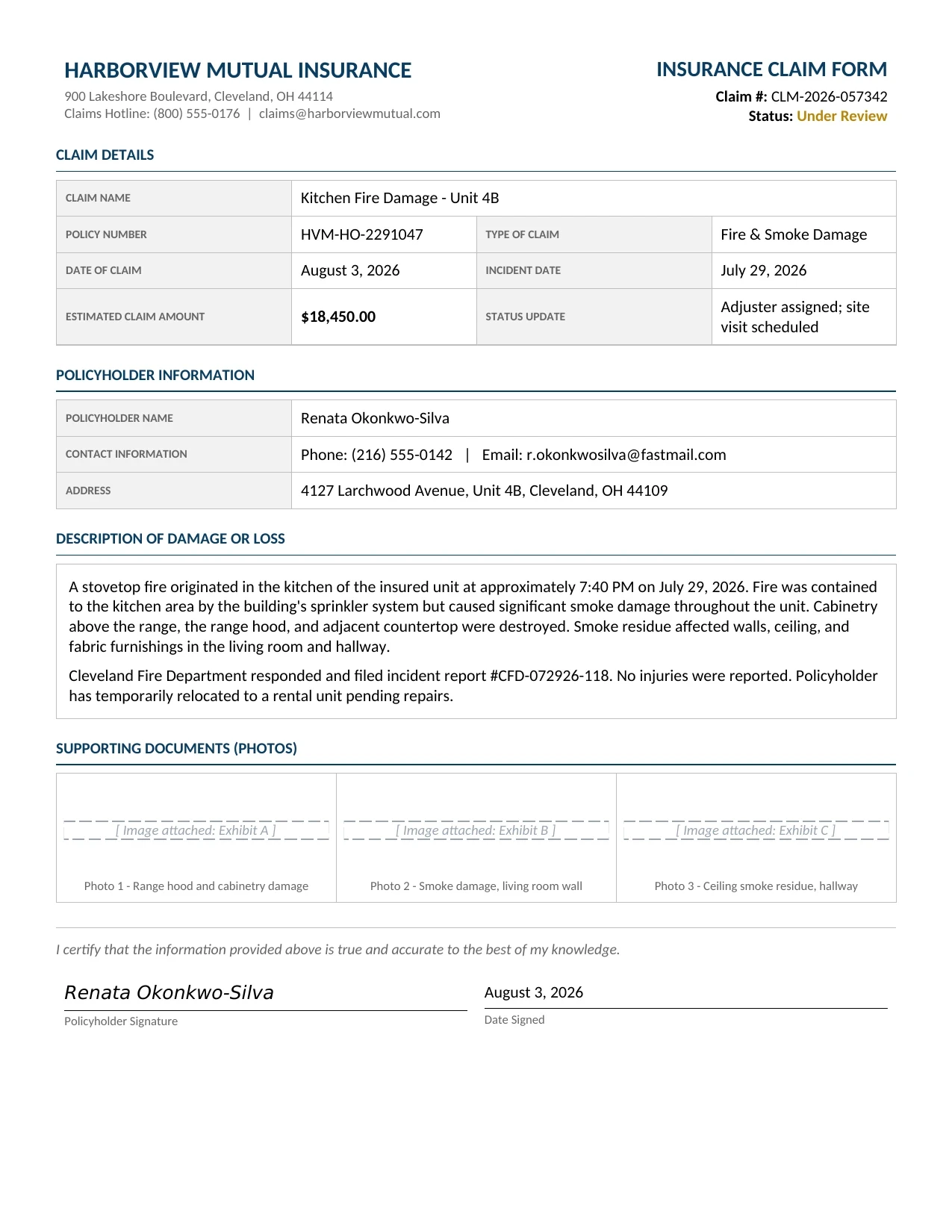
The engine analyzes the page layout and identifies the content that matters. The engine reads each insurance claim document and identifies text and data fields by their semantic context, claim identifiers, policyholder names, damage descriptions, dates, amounts, and contact details, regardless of carrier layout, form design, or whether the document is typed, scanned, or photographed.
- Step 3
Structured JSON is returned
Every extracted element comes back as structured JSON, positioned and typed, ready to feed into downstream systems.
- Step 4
Confidence-based review
Each field carries a confidence score, so low-confidence results can be routed for human review instead of trusted blindly.
Extractable fields
Features
Extracts claim name, policy number, dates, policyholder details, contact information, address, and descriptions of loss from structured and semi-structured claim documents
Reads attached supporting documents such as photos, invoices, and repair estimates alongside the main claim form
Processes scanned paper forms, digital PDFs, and mobile-uploaded images without templates or per-carrier configuration
Returns structured JSON output for direct ingestion into claims management systems, triage queues, or analytics dashboards
Handles multi-page claim bundles, extracts fields across pages and consolidates them into a single structured record
Use cases
Straight-through processing of FNOL submissions
When a first notice of loss arrives by email, portal upload, or mobile app, ByteIt extracts claimant identity, policy reference, incident details, and loss description. The structured output flows directly into the claims management system to create a claim record, assign a claim number, and route it to the appropriate adjuster without manual keying.
Batch processing of peak-season or catastrophe claim volumes
After a storm, flood, or other large-scale event, claims intake can spike tenfold in a single week. ByteIt processes batches of hundreds or thousands of claim documents in parallel, extracting fields from each and outputting structured data that lets triage teams prioritise by severity, location, or estimated amount before a single adjuster picks up a file.
Automated reconciliation of claim estimates and payouts
ByteIt reads repair estimates, invoices, and payment documents attached to a claim, extracting line-level amounts, totals, and payee details. The extracted data can be cross-checked against policy coverage limits and deductibles, flagging discrepancies for review before settlement is approved.
Connect extracted claim data into workflow automation tools
Structured claim output can be sent via REST API or connected through automation platforms like n8n, Zapier, or Make to downstream systems, updating CRM records, triggering approval workflows, sending status notifications to policyholders, or populating business intelligence dashboards for claims analytics.
LIVE DEMO
Try it yourself
Upload a sample insurance claim document, PDF, JPG, or PNG, and see the extracted fields in seconds, no account required.
Select a document and press Parse
Want to run it on your own documents?
Ready to dive in? Request a key to get started.Business advantages
- ISO 27001 certified and GDPR compliant
- Sub-second latency on most single-page documents
- Template-free extraction, works across carrier formats without setup
- Free Build plan with 1,000 credits per month to evaluate
Frequently asked questions
How does ByteIt handle claim documents from different carriers and formats?
ByteIt reads documents by semantic context rather than fixed coordinates or templates. This means a FNOL form from one carrier is processed the same way as an adjuster report from another, the engine finds claim numbers, names, dates, and amounts by what they mean, not where they sit on the page. No per-carrier training or template setup is required.
What file formats are supported for claim documents?
ByteIt accepts PDF, JPEG, PNG, BMP, TIFF, and other common image formats, plus digital documents such as DOCX and XLSX. Scanned paper forms, mobile photos, emailed PDFs, and digitally generated reports are all supported without conversion.
Can ByteIt process multi-page claim files and supporting attachments?
Yes. Claim files often arrive as multi-page PDFs that bundle a claim form, photos, a repair estimate, and a police report into a single document. ByteIt reads across all pages, extracts the relevant fields, and returns a consolidated structured record rather than separate outputs per page.
How accurate is the extraction on handwritten or damaged claim forms?
ByteIt's vision-language models are designed to read text in varied conditions, including handwriting on first notice of loss forms and text on creased or low-quality scans. The engine uses context-aware extraction to improve recognition of numbers and names even when individual characters are unclear. As with any AI system, results improve when the source image is legible and well-lit.
What is the pricing model for processing insurance claims?
ByteIt offers a free Build plan with 1,000 credits per month, a Scale plan at €260 per month with 25,000 credits, and an Enterprise plan with custom credit volumes, zero-retention data handling, and optional VPC or on-premise deployment. One credit typically processes one document page.
How do I integrate ByteIt with my existing claims management system?
ByteIt provides a REST API, a Python SDK, and structured JSON output that can be fed into any claims management platform. You can also connect ByteIt through workflow automation tools such as n8n, Zapier, or Make to route extracted data into your existing queues, dashboards, or notification systems.